
OpenAI Frontier Platform: The Complete Enterprise Guide to Building, Deploying, and Managing AI Agents at Scale
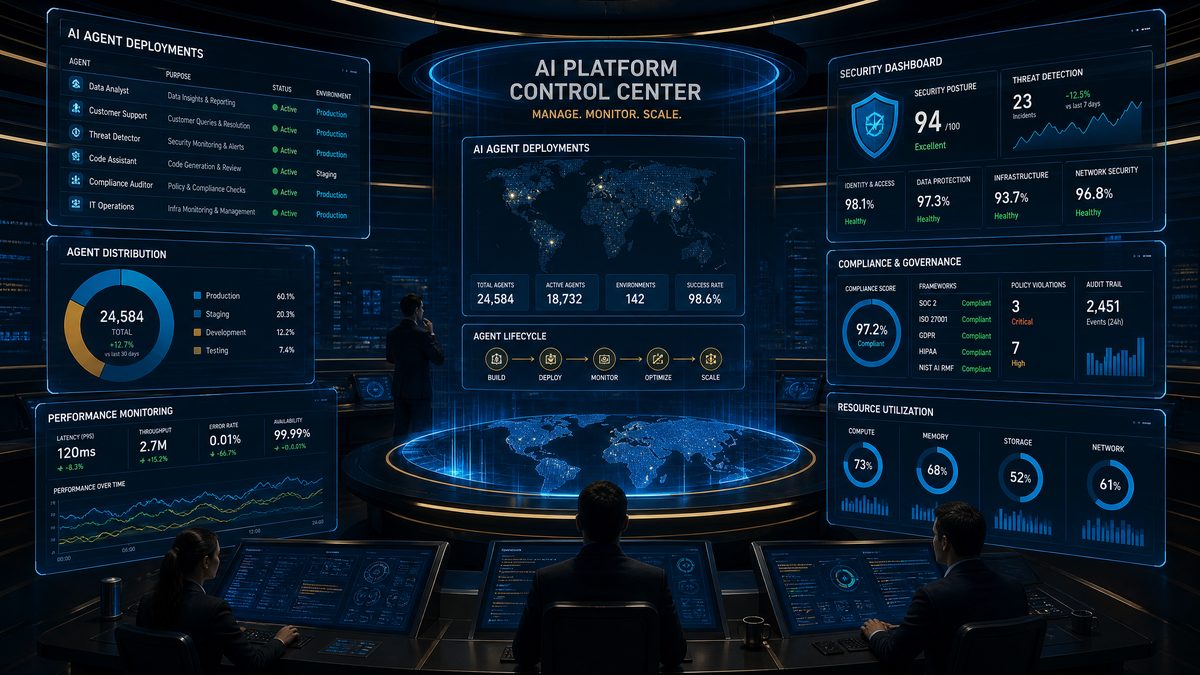
OpenAI Frontier Platform: The Complete Enterprise Guide to Building, Deploying, and Managing AI Agents at Scale
Author: Markos Symeonides
Updated for June 2026: OpenAI Frontier is positioned as an enterprise platform for creating, deploying, securing, monitoring, and governing AI agents that operate as scalable “AI coworkers.” For large organizations, the core value proposition is not merely conversational AI; it is the ability to operationalize reasoning-capable agents across business workflows while maintaining enterprise controls for identity, data access, auditability, compliance, and lifecycle management.
Enterprise adoption of AI agents has moved beyond experimentation. In 2024 and 2025, many organizations piloted copilots, retrieval-augmented generation systems, and workflow automations. By June 2026, the strategic priority has shifted to durable agent operating models: how to give AI agents limited authority, connect them to systems of record, monitor their actions, prove compliance, and continuously improve performance without introducing unacceptable operational risk. Frontier is designed for that environment.
This guide explains what OpenAI Frontier is, how it fits into existing enterprise infrastructure, which capabilities matter most, how security and compliance are typically implemented, and how technology leaders should evaluate deployment patterns, integrations, pricing, ROI, alternatives, and governance. It also includes architecture diagrams described in text, comparison tables, implementation checklists, and industry-specific case studies for financial services, healthcare, and manufacturing.
What OpenAI Frontier Is
OpenAI Frontier is an enterprise AI agent platform built to help organizations design, deploy, manage, and govern AI agents across departments and business processes. The platform treats agents as controlled digital workers rather than standalone chatbots. An agent can receive tasks, reason over instructions and context, call approved tools, retrieve governed enterprise knowledge, ask for human approval, create records, update workflows, summarize activity, and generate auditable logs of its decisions and actions.
The phrase “AI coworker” is important because it reflects a shift in how enterprise teams use AI. A simple chatbot responds to questions. A copiloting assistant helps an employee draft, summarize, or search. An AI agent can carry out multi-step work within defined boundaries. In a customer support environment, for example, an agent might classify an incoming case, retrieve relevant policy, draft a response, check warranty status through an API, request supervisor approval for an exception, and then update Salesforce or ServiceNow. Frontier is built to make that behavior manageable at enterprise scale.
Frontier is not just a model endpoint. It is best understood as a control plane for AI workers. It combines agent design, model selection, tool orchestration, memory and retrieval configuration, identity and permissions, deployment pipelines, observability, evaluation, security policy enforcement, and compliance reporting. Enterprises typically use it alongside existing identity providers, data warehouses, SaaS applications, ticketing systems, collaboration tools, and internal APIs.
For developers, Frontier provides the primitives to define agent roles, instructions, tools, schemas, guardrails, routing logic, evaluation sets, and deployment stages. For enterprise administrators, it provides centralized governance over which agents can access which systems, who can publish agents, what data can be retained, how logs are reviewed, and how policy exceptions are handled. For business teams, it provides reusable AI coworkers that can be embedded in daily workflows rather than accessed only through a separate AI interface.
A practical way to define Frontier is this: it is an enterprise-grade platform for turning OpenAI model capabilities into secure, observable, policy-bound agents that can operate across business systems with human oversight and measurable business outcomes.
Architecture Overview: How Frontier Fits into Enterprise Infrastructure
Frontier architecture is typically organized around five layers: user interaction, agent orchestration, model and reasoning services, enterprise integration, and governance. Each layer has a distinct responsibility, and the separation is essential for security and scalability. In mature deployments, Frontier does not replace existing enterprise systems. Instead, it sits between employees, models, and business applications as an orchestration and governance layer.
The user interaction layer includes channels such as Slack, Microsoft Teams, web portals, embedded enterprise apps, mobile applications, and service desk interfaces. Employees should be able to invoke agents where they already work. A finance analyst may use an agent inside Teams to investigate an invoice discrepancy. A support specialist may interact with an agent inside ServiceNow. A field engineer may use a mobile app connected to Frontier to troubleshoot equipment while offline or on a constrained network.
The agent orchestration layer is the operational center of Frontier. It interprets the task, selects the correct agent or sub-agent, applies policies, retrieves approved context, invokes tools, manages state, routes work to humans when required, and records execution traces. This layer is also where enterprises define role boundaries. A procurement agent might be authorized to compare suppliers and draft purchase requests but not approve payments. A healthcare coding agent might suggest billing codes but require human review before submission.
The model and reasoning layer uses OpenAI models configured for the workload’s accuracy, latency, cost, and compliance requirements. Enterprises may route simple classification tasks to smaller, lower-cost models while reserving advanced reasoning models for complex analysis, exception handling, contract review, or multi-step planning. Frontier’s value is partly in making that routing manageable, observable, and governed rather than leaving every development team to build its own model orchestration stack.
The enterprise integration layer connects agents to systems such as Salesforce, ServiceNow, Workday, SAP, Oracle, Snowflake, Databricks, Microsoft 365, Google Workspace, Slack, Teams, GitHub, Jira, Confluence, internal databases, private APIs, vector search systems, document repositories, and robotic process automation tools. Integrations should be designed around least privilege, scoped credentials, durable audit logs, and explicit tool contracts. Frontier should never give an agent broad, unbounded access to enterprise systems merely because it can reason well.
The governance layer includes identity and access management, policy enforcement, audit logging, security controls, data residency settings, evaluation pipelines, change management, approval workflows, incident response, and compliance reporting. This layer is what differentiates an enterprise agent platform from a collection of prototypes. It allows security teams, legal teams, compliance officers, and business owners to understand what an agent is allowed to do, what it has done, and how its performance changes over time.
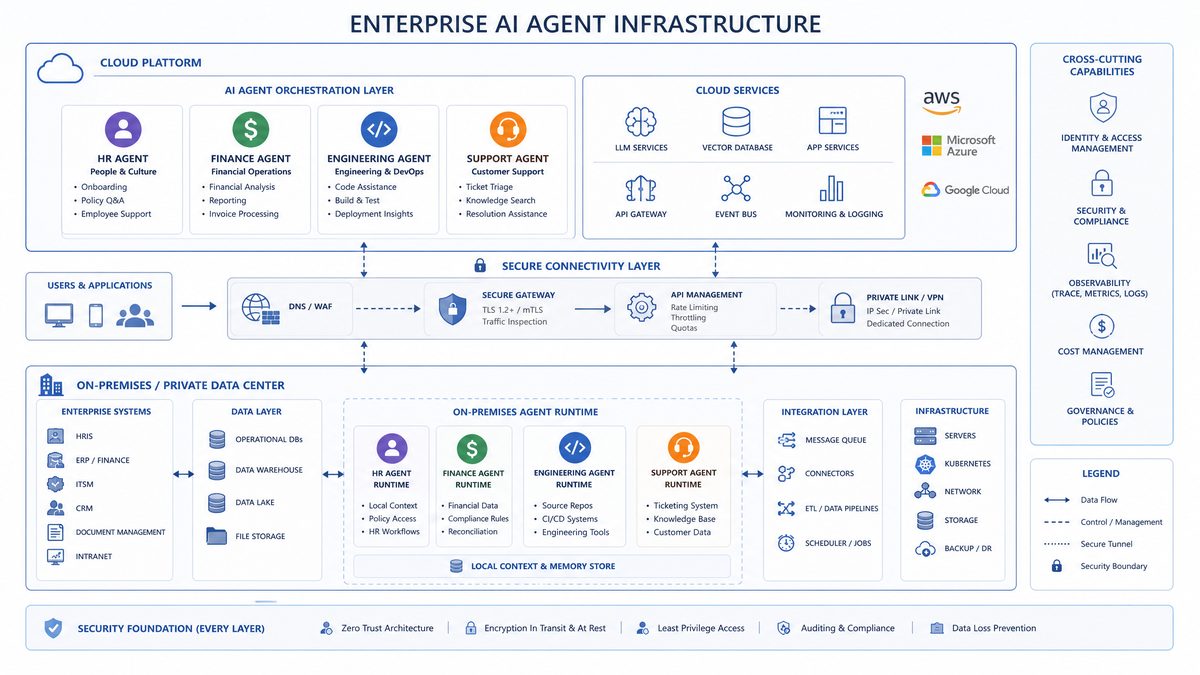
Architecture Diagram Described in Text
Imagine the architecture as a left-to-right diagram with five vertical columns. The first column is labeled “User Channels” and contains Slack, Teams, web app, mobile app, CRM, ITSM, and internal portal. Arrows flow into the second column, “Frontier Agent Runtime,” which includes agent router, instruction manager, tool planner, policy engine, conversation state, human approval queue, and execution trace store. The third column is “OpenAI Model Layer,” containing model routing, reasoning models, multimodal models, embeddings, and evaluation models. The fourth column is “Enterprise Systems,” including Salesforce, ServiceNow, SAP, Snowflake, EHR, document repositories, custom APIs, and message queues. The fifth column spans the entire diagram from top to bottom and is labeled “Governance, Security, and Observability,” showing identity provider, role-based access control, encryption, audit logs, monitoring, compliance reporting, and data residency controls.
This architecture makes one principle explicit: agents should not directly roam through enterprise systems. They operate through approved connectors, narrow API scopes, policy gates, and traceable tool calls. Every business-critical action should be attributable to a user, agent, tool, policy decision, and timestamp. The best Frontier implementations make AI agency visible rather than mysterious.
Organizations evaluating the Frontier platform should first understand the fundamentals of AI agent construction. Our step-by-step guide to building an AI agent with GPT-5 Pro covers the core architecture patterns, tool integration methods, and deployment strategies that form the foundation of enterprise agent systems. How to Build an AI Agent with GPT-5 Pro in 2026: Step-by-Step
Key Capabilities of Frontier for Enterprise AI Agents
Frontier’s core capabilities can be grouped into agent creation, deployment, monitoring, security, compliance, integration, evaluation, and lifecycle management. Enterprises should evaluate the platform not by the quality of a single demo but by how consistently it supports these capabilities across hundreds or thousands of workflows.
Agent Creation and Configuration
Agent creation begins with role design. A Frontier agent should have a clear job description, success criteria, allowed data sources, approved tools, escalation rules, and prohibited actions. Developers and business owners define the agent’s instructions, domain knowledge, tool schemas, response format, fallback behavior, and human-in-the-loop thresholds. The strongest designs avoid vague prompts such as “help the sales team” and instead define operational responsibilities such as “prepare renewal risk briefs for enterprise accounts using CRM notes, support tickets, product usage metrics, and approved pricing policy.”
Frontier-style agent creation usually includes reusable templates for common enterprise roles: support triage agent, sales research agent, compliance review agent, IT help desk agent, procurement intake agent, HR policy assistant, contract redlining agent, manufacturing maintenance agent, and security operations summarization agent. Templates help standardize governance because they encode known patterns for permissions, escalation, logging, and evaluation.
Tool Calling and Workflow Execution
Tools are the bridge between reasoning and action. Frontier agents use tools to query databases, search documents, create tickets, update CRM fields, send messages, generate reports, trigger workflows, or call internal APIs. Tool contracts should define input schemas, output schemas, authentication requirements, rate limits, error handling, and policy tags. A well-designed tool ecosystem lets agents act reliably without granting them unrestricted system access.
For example, a customer success agent should not receive a full administrator token for Salesforce. It should call a scoped tool such as get_account_health_summary, create_renewal_risk_note, or draft_customer_followup. Each tool should enforce business rules independently. If an agent attempts to exceed its authority, the tool should reject the request and generate an auditable event.
Deployment and Release Management
Enterprise deployments require staging, testing, approval, versioning, rollback, and change documentation. Frontier should support development, sandbox, pilot, and production environments. Each agent version should include instructions, tool definitions, model configuration, retrieval settings, policies, evaluation results, and release notes. A production agent should be promoted only after passing offline evaluations, red-team tests, security review, and business owner acceptance.
The release process should resemble modern software delivery. Agent changes can affect regulated decisions, customer communications, security posture, and employee productivity. Enterprises should therefore treat agent updates as governed changes, not casual prompt edits. Frontier’s lifecycle management capabilities are most valuable when they allow organizations to trace which agent version handled which task and why.
Monitoring and Observability
Monitoring an AI agent requires more than uptime and latency metrics. Frontier observability should include task success rate, tool invocation rate, escalation rate, hallucination indicators, policy violation attempts, user satisfaction, average handling time, cost per workflow, model routing distribution, retrieval quality, and human override frequency. Execution traces should show what the agent saw, what context it retrieved, which tools it called, what decisions it made, and where guardrails intervened.
Enterprise observability should also support anomaly detection. A sudden increase in tool failures may indicate an API change. A rise in escalations may indicate unclear instructions or a new business policy. A drop in answer quality may indicate stale retrieval content. A spike in token usage may indicate prompt injection, runaway loops, or poorly constrained tasks. Frontier should enable operations teams to identify these issues before they become customer-facing incidents.
Evaluation and Continuous Improvement
Evaluation is the foundation of safe scaling. Enterprises should maintain test sets for each high-value agent, including normal cases, edge cases, adversarial prompts, policy conflicts, ambiguous user requests, incomplete data, and known failure modes. Frontier should support automated evaluations using expected outputs, rubric-based scoring, semantic similarity, tool-use correctness, safety checks, and human review queues.
Continuous improvement should be evidence-driven. If an agent fails because retrieval returned outdated policy, the fix may be content governance rather than prompt engineering. If an agent fails because it selected the wrong tool, the fix may be better tool descriptions, narrower tool schemas, or model routing changes. If an agent escalates too often, the fix may be clearer authority boundaries. Frontier’s evaluation layer should help teams diagnose root causes rather than merely produce aggregate scores.
Security Model: Compliance, Data Protection, and Access Controls
Security is the deciding factor for enterprise AI agents. An agent that can read sensitive data, generate business recommendations, and perform actions across systems must be governed like a privileged application and monitored like a digital employee. Frontier’s security model should be assessed across compliance posture, encryption, data residency, identity integration, access control, auditability, data retention, prompt injection defenses, and incident response.
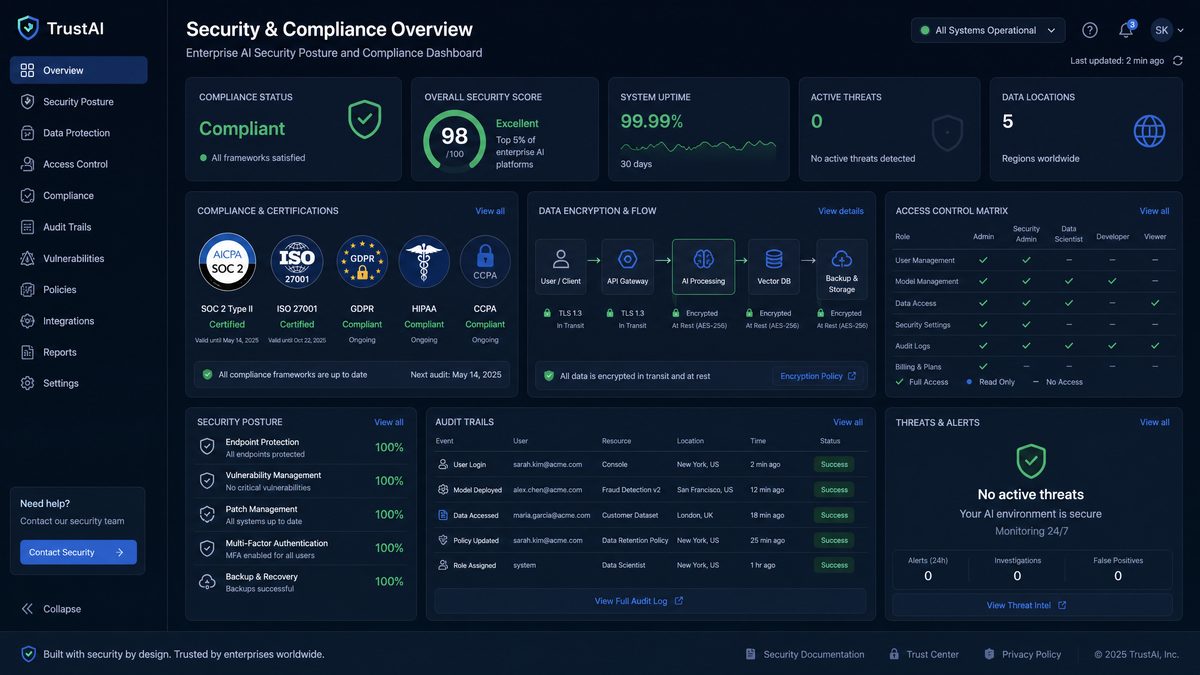
SOC 2 and Enterprise Compliance
Frontier enterprise deployments should align with SOC 2 principles for security, availability, confidentiality, processing integrity, and privacy. SOC 2 compliance does not automatically make every customer deployment compliant, but it provides an important assurance framework for vendor controls. Enterprises should request current audit reports, understand the scope of covered services, review subprocessor lists, and map Frontier controls to internal risk requirements.
In regulated sectors, SOC 2 is often only the baseline. Financial services organizations may require evidence aligned with FFIEC expectations, FINRA recordkeeping, SEC cyber risk governance, and internal model risk management practices. Healthcare organizations may require HIPAA-aligned business associate agreements, protected health information handling controls, and audit trails. Manufacturers with defense contracts may require export control considerations, CMMC alignment, or strict supplier data segregation. Frontier evaluations should therefore include both platform-level attestations and workload-specific control design.
Data Residency and Regional Controls
Data residency has become a board-level concern for enterprises operating across regions. Frontier deployments should support regional processing options, customer-controlled retention policies, and clear documentation about where prompts, responses, logs, embeddings, and retrieved content are stored or processed. Multinational organizations should design separate regional agent workspaces when legal, regulatory, or contractual obligations require data boundaries.
For European operations, teams should assess GDPR implications, including lawful basis, data minimization, data subject rights, cross-border transfer mechanisms, and automated decision-making considerations. For public sector or critical infrastructure deployments, residency requirements may be stricter. The practical implementation pattern is to classify agents by data sensitivity and geography, then bind each agent to approved regions, connectors, storage locations, and retention schedules.
Encryption and Key Management
Encryption should apply in transit and at rest. Enterprise traffic should use modern TLS, and stored content such as logs, configuration, embeddings, and cached context should be encrypted using strong key management practices. For higher-sensitivity workloads, organizations may require customer-managed keys, hardware security modules, or bring-your-own-key models. Key rotation, revocation, separation of duties, and access logging are essential for regulated environments.
Enterprises should also decide whether particular data classes should ever be sent to a model. Sensitive secrets, private keys, payment card numbers, full medical records, and highly confidential merger documents may require redaction, tokenization, or exclusion from agent workflows. Encryption protects data in transit and at rest, but governance determines whether data should be used by an agent in the first place.
Identity, Access Control, and Authorization
Frontier should integrate with enterprise identity providers such as Microsoft Entra ID, Okta, Ping Identity, or Google Cloud Identity. Single sign-on, SCIM provisioning, role-based access control, group-based policy, and multi-factor authentication are foundational. Agent access should be mapped to both the human user and the agent role. When an agent performs an action, the audit log should show whether it acted on behalf of a user, under a service identity, or through a delegated authorization flow.
Least privilege is the critical design principle. Each agent should have the minimum permissions required for its tasks. Developers should avoid catch-all connectors and broad data access. A legal contract agent may need access to executed agreements and clause libraries but not payroll data. An IT help desk agent may reset passwords through an approved workflow but not directly alter privileged account policies. Strong agent authorization design prevents capability creep.
Prompt Injection and Tool Abuse Defenses
Prompt injection remains one of the most important risks for tool-using agents. A malicious instruction hidden in a document, email, webpage, ticket, or chat message may attempt to override the agent’s system instructions, exfiltrate data, or trigger unauthorized actions. Frontier deployments should include layered defenses: trusted instruction hierarchy, content isolation, retrieval source labeling, tool confirmation policies, allowlisted domains, sensitive action approvals, output filtering, and anomaly detection.
Tool abuse defenses should be implemented at the tool layer, not only in the agent prompt. If a tool can transfer funds, update patient records, delete production data, or send external communications, it must enforce authorization, validation, transaction limits, and approval requirements independently. Agents should be treated as untrusted callers until policy checks pass. This approach reflects mature zero-trust design for AI systems.
For enterprises requiring on-premises deployment options within the Frontier ecosystem, our analysis of the Dell AI Factory partnership with OpenAI Codex examines how organizations in regulated industries are deploying AI agents locally while maintaining the security and compliance standards that Frontier enforces. Dell AI Factory + OpenAI Codex: How On-Premises AI Agents Are Changing Enterprise Software Development
Deployment Patterns: Cloud-Hosted, Hybrid, and On-Premises Options
Enterprises should choose a deployment pattern based on data sensitivity, latency, regulatory requirements, integration complexity, operational maturity, and cost. In practice, most large organizations adopt more than one pattern. A cloud-hosted deployment may support sales enablement and internal knowledge agents, while a hybrid deployment supports regulated workflows, and a restricted on-premises pattern supports highly sensitive environments.
Cloud-Hosted Deployment
In the cloud-hosted model, Frontier’s control plane and agent runtime are operated as a managed service. This model is generally the fastest to deploy and the easiest to maintain. It is well suited for knowledge management, customer support, sales operations, employee productivity, marketing operations, software engineering assistance, and other workflows where enterprise cloud usage is already accepted.
The advantages are speed, scalability, managed updates, integrated observability, and lower infrastructure overhead. The risks include dependency on external service availability, data residency constraints, and the need for careful contractual review. Enterprises choosing this pattern should validate regional availability, retention controls, subprocessor commitments, identity integration, audit export, and incident notification terms.
Hybrid Deployment
Hybrid deployment keeps selected data, connectors, or execution components inside the enterprise environment while using Frontier’s managed control plane or model services. This pattern is common when sensitive systems cannot be directly exposed to a SaaS runtime. For example, an agent may operate in a managed Frontier workspace but access an internal claims database through a customer-hosted connector that enforces policy, redaction, and audit logging before returning results.
Hybrid architecture often provides the best balance between innovation and control. It allows organizations to use advanced model capabilities while keeping sensitive integration logic and data access close to the systems of record. However, it requires stronger platform engineering skills. Teams must manage network connectivity, private endpoints, connector security, event queues, logging pipelines, and failure modes across boundaries.
On-Premises or Sovereign Deployment
On-premises and sovereign deployment patterns are reserved for the most sensitive workloads, strict regulatory environments, national security contexts, or jurisdictions requiring local operational control. In this pattern, major runtime components, connectors, logs, and data stores may operate within customer-controlled infrastructure or a sovereign cloud. Model availability, performance, and update cadence may differ from fully managed deployments, depending on contractual and technical constraints.
The benefits include maximum data control, network isolation, and alignment with strict procurement requirements. The trade-offs include higher cost, greater operational complexity, slower feature adoption, and increased responsibility for platform reliability. Enterprises should avoid defaulting to on-premises deployment unless a documented risk assessment justifies it. In many cases, a hybrid architecture with strong data minimization is more practical.
| Deployment Pattern | Best Fit | Advantages | Trade-Offs | Enterprise Controls to Validate |
|---|---|---|---|---|
| Cloud-hosted | Productivity, support, sales, knowledge management, general enterprise workflows | Fastest deployment, managed scaling, lower operational burden, frequent feature updates | Requires vendor trust, residency review, dependency on external service availability | SSO, audit export, regional processing, retention controls, encryption, contractual commitments |
| Hybrid | Regulated workflows, sensitive integrations, private data access, complex enterprise systems | Balanced control and innovation, internal connector enforcement, flexible data minimization | Higher engineering complexity, more integration testing, shared operational responsibility | Private networking, connector hardening, policy enforcement, redaction, observability correlation |
| On-premises or sovereign | Highly sensitive, defense, public sector, strict residency, critical infrastructure | Maximum control, network isolation, local governance, strict boundary enforcement | Highest cost, slower updates, operational responsibility, potential feature limitations | Key management, local audit retention, disaster recovery, model update governance, infrastructure security |
Integration with Existing Enterprise Tools
Frontier’s enterprise value depends on integration quality. Agents must work inside the tools employees already use and must access systems of record through controlled interfaces. A disconnected agent may produce useful text, but an integrated agent can reduce cycle time, automate handoffs, and improve data quality.
Slack and Microsoft Teams
Slack and Teams are common entry points for enterprise agents because they support conversational workflows, channel context, approvals, notifications, and collaboration. A Frontier agent embedded in Slack can monitor a support escalation channel, summarize incident updates, identify missing information, and draft customer communications. In Teams, an agent can join a project workspace, summarize meeting outcomes, create action items, and update Planner, Jira, or ServiceNow through approved connectors.
The key design issue is context boundaries. Agents should not assume that every message in a channel is authorized context for every task. Channel membership, sensitivity labels, private messages, and file permissions should inform what an agent can see and use. Organizations should also define whether agents can post externally, mention users, create meetings, or trigger workflows without approval.
Salesforce and CRM Systems
Salesforce integration is valuable for sales, customer success, support, renewals, and revenue operations. Frontier agents can prepare account briefs, identify churn risks, summarize opportunity history, draft follow-up emails, update next steps, detect stale pipeline data, and compare support sentiment against renewal timing. The agent should use scoped CRM tools rather than unrestricted access.
Enterprises should treat CRM updates as business records. If an agent updates forecast notes, opportunity stage, support status, or customer sentiment, the change should be traceable. In many organizations, the best pattern is draft-first automation: the agent proposes updates, the account owner reviews, and the approved update is written to CRM with attribution.
ServiceNow and ITSM Workflows
ServiceNow integration enables AI agents for IT support, HR service delivery, security operations, facilities management, and enterprise service management. A Frontier IT help desk agent can classify tickets, suggest knowledge articles, collect missing troubleshooting information, reset passwords through approved workflows, route incidents, and summarize resolution steps.
For ITSM workflows, escalation rules matter. Agents should identify when a user is reporting a security incident, production outage, executive issue, or regulated data exposure. The agent should also respect separation between recommendation and execution. For example, it may recommend a remediation plan for a critical server incident but require a human engineer to approve changes to production infrastructure.
Custom APIs and Internal Systems
Most large enterprises have proprietary systems that cannot be addressed through off-the-shelf connectors. Frontier should support custom API integration through well-defined tool schemas, service accounts, private networking, message queues, event-driven workflows, and secure secret management. The most reliable approach is to build narrow tools that represent business capabilities rather than exposing raw database access.
For example, instead of giving an agent SQL access to a claims database, a healthcare payer might expose tools such as lookup_claim_status, retrieve_member_eligibility_summary, and submit_prior_authorization_draft. These tools can enforce access checks, redact sensitive fields, validate inputs, and log every request. Good tool design is a governance mechanism as much as an engineering practice.
Example Agent Tool Manifest
The following simplified example shows the type of tool contract an enterprise team might define for a Frontier customer support agent. The structure emphasizes scope, input validation, approval requirements, and audit tags rather than giving the agent broad application access.
{
  "agent": "enterprise_support_triage_agent",
  "version": "1.4.2",
  "tools": [
    {
      "name": "get_customer_entitlement",
      "description": "Returns support plan, contract status, region, and escalation tier for a customer account.",
      "authentication": "delegated_user_context",
      "allowed_roles": ["support_agent", "support_manager"],
      "input_schema": {
        "type": "object",
        "required": ["account_id"],
        "properties": {
          "account_id": {
            "type": "string",
            "pattern": "^ACC-[0-9]{8}$"
          }
        }
      },
      "data_classification": "confidential_customer_data",
      "audit_tags": ["crm_lookup", "customer_support"]
    },
    {
      "name": "create_case_summary_note",
      "description": "Creates a draft summary note on an existing support case for human review.",
      "authentication": "service_identity_with_user_attribution",
      "requires_human_approval": true,
      "input_schema": {
        "type": "object",
        "required": ["case_id", "summary", "evidence_links"],
        "properties": {
          "case_id": {
            "type": "string"
          },
          "summary": {
            "type": "string",
            "maxLength": 3000
          },
          "evidence_links": {
            "type": "array",
            "items": {
              "type": "string"
            }
          }
        }
      },
      "audit_tags": ["case_update", "human_review_required"]
    }
  ]
}
How to Build an AI Agent with GPT-5 Pro in 2026: Step-by-Step
Pricing Model and ROI Analysis for Enterprise Adoption
Enterprise pricing for an AI agent platform should be evaluated as a combination of platform fees, model usage, storage, integrations, support tier, security features, deployment pattern, and professional services. Public list pricing is often insufficient for large-scale planning because enterprise contracts may include committed spend, volume discounts, dedicated capacity, regional requirements, custom retention, premium support, and compliance add-ons. Procurement teams should model total cost of ownership rather than focusing only on token prices.
A practical pricing model includes five cost categories. First, platform licensing covers access to Frontier workspaces, administrative controls, agent runtime capabilities, monitoring, and governance features. Second, model usage includes input tokens, output tokens, reasoning effort, embeddings, multimodal processing, and evaluation workloads. Third, integration costs include connector development, API gateway capacity, middleware, data preparation, and identity integration. Fourth, security and compliance costs include reviews, audits, data protection assessments, red-team testing, and ongoing monitoring. Fifth, operating costs include platform engineers, agent owners, business reviewers, support staff, and training.
| Cost Category | What It Includes | Primary Cost Driver | Optimization Strategy |
|---|---|---|---|
| Platform licensing | Enterprise workspaces, admin controls, runtime, governance, observability | Number of users, agents, environments, or committed capacity | Start with high-value departments, consolidate duplicate agents, negotiate committed usage tiers |
| Model usage | Prompts, responses, reasoning, embeddings, evaluations, multimodal processing | Task volume, context size, model choice, evaluation frequency | Use model routing, retrieval compression, caching, smaller models for routine tasks |
| Integration engineering | Connectors, API wrappers, identity, networking, data pipelines | Number and complexity of systems connected | Build reusable tool patterns, prioritize systems of record, use middleware standards |
| Security and compliance | Risk assessments, audits, red-team testing, privacy reviews, policy controls | Regulatory sensitivity and data classification | Create standard control templates, classify agents by risk tier, automate evidence collection |
| Operations and governance | Agent owners, monitoring, incident response, evaluation, user training | Number of production agents and critical workflows | Establish a central AI agent office, define reusable playbooks, automate monitoring |
ROI Framework
ROI should be calculated at the workflow level. The strongest business cases identify a measurable process with clear baseline metrics: average handling time, cost per ticket, analyst hours per report, sales cycle time, claim review backlog, defect investigation time, compliance review cost, or mean time to resolution. AI agent ROI becomes credible when teams compare pre-agent and post-agent performance under controlled conditions.
A common ROI formula is: annual value equals labor hours saved plus revenue uplift plus risk reduction plus quality improvement minus total annual cost. Labor savings are easiest to quantify but should not be the only metric. In customer support, faster resolution can improve retention. In sales, better account preparation can improve conversion. In compliance, improved evidence collection can reduce audit effort. In manufacturing, faster root cause analysis can reduce downtime. Frontier adoption should be tied to these operational outcomes.
Consider a support organization handling 600,000 tickets per year with an average fully loaded handling cost of $9 per ticket. If a Frontier support triage agent reduces average manual handling effort by 22% while maintaining quality, the gross productivity value is approximately $1.19 million annually. If the deployment costs $450,000 annually including platform, usage, integrations, and operations, the first-year net benefit is about $740,000 before considering customer satisfaction improvements and reduced escalation backlog.
ROI analysis should also account for ramp-up. The first 90 days often involve design, security review, integration, pilot testing, and user training. Benefits may compound after reusable connectors and governance patterns are established. A single well-governed Salesforce connector, for example, can support sales, renewals, support, and customer success agents. Enterprises should therefore model platform ROI over a 24-month horizon rather than judging only the initial pilot.
Comparison with Microsoft Copilot Studio, Google Vertex AI Agents, and AWS Bedrock Agents
OpenAI Frontier competes in a rapidly evolving enterprise AI agent market. Microsoft, Google Cloud, and AWS each offer agent-building capabilities tied to their ecosystems. The right choice depends on existing cloud strategy, productivity suite, data platform, developer preferences, compliance requirements, model flexibility, and governance maturity.
| Platform | Core Strength | Best Enterprise Fit | Integration Advantage | Potential Limitation |
|---|---|---|---|---|
| OpenAI Frontier | Advanced agent orchestration with OpenAI reasoning capabilities, enterprise governance, and flexible tool integration | Organizations prioritizing high-quality reasoning agents across multiple systems and clouds | Strong model capabilities, flexible custom API patterns, cross-functional agent design | Requires disciplined governance and integration architecture to avoid fragmented deployments |
| Microsoft Copilot Studio | Low-code agent creation integrated with Microsoft 365, Power Platform, Dynamics, and Teams | Microsoft-centric enterprises standardizing on Teams, SharePoint, Dynamics, and Power Automate | Native Microsoft ecosystem integration and citizen-developer accessibility | May be less flexible for non-Microsoft environments or complex custom orchestration patterns |
| Google Vertex AI Agents | Cloud-native AI development with Google Cloud data, search, and model tooling | Enterprises built around Google Cloud, BigQuery, Vertex AI, and Google Workspace | Strong data and ML platform integration, search grounding, cloud-native development workflows | May require deeper cloud engineering expertise and Google Cloud alignment |
| AWS Bedrock Agents | Agent orchestration across foundation models with AWS security and infrastructure services | AWS-first enterprises needing model choice, private networking, and integration with AWS services | Strong IAM, VPC, Lambda, Step Functions, data service, and multi-model ecosystem integration | Can require substantial AWS architecture expertise and custom governance assembly |
How to Choose
Choose Frontier when the central requirement is to build high-quality AI coworkers with strong reasoning, flexible enterprise integrations, and a governance model that can span multiple business systems. It is particularly attractive for enterprises that do not want agent strategy locked entirely into one productivity suite or cloud provider. It is also compelling when agent performance on complex reasoning, summarization, tool selection, and multi-step workflows is a differentiator.
Choose Microsoft Copilot Studio when the organization is deeply standardized on Microsoft 365, Teams, SharePoint, Dynamics, and Power Platform, and when business users need low-code agent creation within a familiar environment. Copilot Studio can be especially effective for departmental productivity agents, internal service bots, and workflows that align naturally with Power Automate and Microsoft Graph.
Choose Google Vertex AI Agents when the enterprise is heavily invested in Google Cloud data infrastructure and wants close integration with BigQuery, Vertex AI pipelines, search, and cloud-native ML operations. Google’s approach is strong for data-rich applications, search-grounded agents, analytics workflows, and organizations with mature cloud AI engineering teams.
Choose AWS Bedrock Agents when the enterprise prioritizes model choice, AWS-native security, private networking, and integration with Lambda, Step Functions, S3, DynamoDB, Kendra, Redshift, and other AWS services. Bedrock is often attractive to platform teams that want to build a custom agent fabric using AWS primitives and have the engineering resources to manage it.
The practical reality is that large enterprises may use more than one platform. A Microsoft-centric productivity agent, an AWS-native operations agent, and a Frontier-powered cross-system reasoning agent can coexist if governance is centralized. The risk is not platform diversity itself; the risk is unmanaged fragmentation, inconsistent controls, duplicate connectors, and untracked agent behavior.
Best Practices for Enterprise AI Agent Governance
AI agent governance determines whether an enterprise can scale beyond pilots. Governance should not be treated as a late-stage compliance task. It must be embedded into agent design, tool development, deployment pipelines, monitoring, incident response, and retirement. The goal is to enable adoption while preventing uncontrolled autonomy, data leakage, regulatory exposure, and operational confusion.
Establish an AI Agent Operating Model
Enterprises should create a formal operating model that defines roles and responsibilities. Typical roles include executive sponsor, AI platform owner, security owner, legal and privacy reviewer, business process owner, agent product owner, developer, data steward, risk reviewer, and operations lead. Each production agent should have a named business owner accountable for outcomes and a technical owner accountable for reliability and controls.
The operating model should classify agents by risk tier. A low-risk knowledge assistant that answers questions from public documentation requires lighter controls than an agent that updates financial records or recommends clinical actions. Risk tiers should consider data sensitivity, user population, external impact, action authority, regulatory relevance, and reversibility of actions.
Define Agent Authority Boundaries
Every agent should have explicit authority boundaries. These boundaries should state what the agent can decide, what it can recommend, what it can draft, what it can execute, and what requires human approval. The difference between drafting and executing is critical. A contract agent drafting a clause is different from an agent approving legal terms. A finance agent preparing a payment exception report is different from an agent releasing funds.
Authority boundaries should be reflected in tools, policies, and user interface design. If an action requires human approval, the approval step should be enforced technically, not merely described in instructions. Approval records should include the agent’s recommendation, evidence used, human approver, decision, timestamp, and final action.
Use Human-in-the-Loop Where Consequences Are Material
Human-in-the-loop design is not a sign of weak automation. It is a control strategy. High-impact workflows should use AI agents to accelerate analysis, collect evidence, draft recommendations, and reduce manual effort while reserving final judgment for qualified humans. Over time, organizations may automate lower-risk decisions where performance evidence supports it, but escalation rules should remain clear.
Good human-in-the-loop systems avoid rubber-stamping. The reviewer should see the agent’s reasoning summary, source evidence, tool outputs, uncertainty indicators, and policy constraints. If reviewers cannot understand why the agent recommended an action, they cannot provide meaningful oversight.
Maintain Agent Inventories and Audit Trails
An enterprise should maintain a live inventory of all agents, including owner, purpose, risk tier, data sources, tools, model configuration, deployment environment, user groups, retention policy, evaluation status, and last review date. Without inventory, governance becomes reactive. Shadow agents can emerge in departments, creating inconsistent behavior and security exposure.
Audit trails should be tamper-resistant and searchable. Security, compliance, and operations teams should be able to reconstruct agent activity for incidents, customer disputes, regulatory inquiries, and internal reviews. Logs should include prompts and responses where permitted, retrieved document references, tool calls, policy decisions, approvals, errors, and output delivery destinations.
Govern Knowledge Sources and Retrieval
Retrieval quality directly affects agent quality. Enterprises should treat knowledge sources as managed assets. Documents should have owners, freshness dates, classification labels, access permissions, and retirement policies. Agents should prefer authoritative sources over informal content. If policy documents conflict, the retrieval system should prioritize approved policy repositories and show source lineage.
Retrieval governance also requires access-aware indexing. An agent should not retrieve a document for a user who lacks permission to view it. Vector search systems must preserve document-level and section-level access controls. In regulated workflows, retrieval logs should show which sources influenced an answer or action.
Implement Continuous Red-Teaming
Red-teaming should test prompt injection, data exfiltration attempts, policy evasion, role confusion, malicious documents, incorrect tool use, unsafe recommendations, and social engineering scenarios. Red-team cases should become part of the regression test suite. As agents gain new tools or access new data sources, the attack surface changes and tests should be updated.
Enterprises should also test benign failure modes. Agents may misunderstand abbreviations, rely on outdated policies, over-escalate, under-escalate, misclassify edge cases, or produce plausible but incomplete answers. Governance should address quality risk as well as security risk.
Implementation Checklist for Frontier Adoption
A successful Frontier program should begin with a focused, high-value use case and expand through repeatable platform patterns. The following checklist is designed for CIOs, CTOs, CISOs, enterprise architects, platform teams, and AI program leaders planning production adoption.
Strategy and Use Case Selection
- Identify workflows with measurable baselines, high volume, clear pain points, and accessible data sources.
- Prioritize use cases where agents can reduce cycle time, improve quality, or increase revenue without requiring unsafe autonomy.
- Define business KPIs before building, including cost per task, handling time, backlog, error rate, satisfaction, revenue impact, or compliance effort.
- Assign a business owner and technical owner for each proposed agent.
- Classify the use case by risk tier, data sensitivity, regulatory impact, and action authority.
Architecture and Integration
- Select deployment pattern: cloud-hosted, hybrid, on-premises, or a combination by workload class.
- Integrate with enterprise identity provider for SSO, group mapping, and lifecycle management.
- Design narrow, audited tools rather than exposing broad system access.
- Implement private connectivity, API gateways, secrets management, and rate limiting for sensitive integrations.
- Define retrieval sources, access controls, freshness requirements, and source ranking rules.
Security and Compliance
- Review SOC 2 reports, subprocessor lists, data processing terms, and enterprise security documentation.
- Define retention policies for prompts, responses, logs, embeddings, and evaluation data.
- Map data residency requirements to agent workspaces and deployment regions.
- Implement encryption requirements, key management controls, and secret handling procedures.
- Test prompt injection, unauthorized tool use, sensitive data leakage, and privilege escalation scenarios.
Development and Evaluation
- Create agent instructions with specific role boundaries, escalation rules, and prohibited actions.
- Build evaluation datasets covering normal workflows, edge cases, adversarial inputs, and policy conflicts.
- Run offline evaluations before pilot deployment and compare results against human benchmarks where possible.
- Define approval gates for promotion from development to sandbox, pilot, and production.
- Version all agent configurations, tool definitions, retrieval settings, and policy rules.
Operations and Scaling
- Monitor task success, escalation rate, latency, cost, user satisfaction, tool errors, and policy interventions.
- Establish incident response procedures for unsafe output, data exposure, integration failure, and unexpected agent behavior.
- Maintain an enterprise agent inventory with ownership, risk tier, tools, data sources, and review dates.
- Train users on appropriate use, limitations, feedback channels, and escalation procedures.
- Review agent performance regularly and retire agents that no longer meet business or control requirements.
Case Studies: Enterprise Frontier Use Cases
The following case studies illustrate how enterprises can apply Frontier-style AI agents in regulated and operationally complex environments. They are representative patterns based on common enterprise requirements rather than claims about specific named customers.
Financial Services: Wealth Management Compliance Assistant
A global wealth management firm wants to reduce the time advisors spend preparing client review materials while maintaining strict compliance over communications and recommendations. The firm deploys a Frontier agent that creates draft client briefing packs using CRM data, portfolio summaries, approved market commentary, risk profile information, and internal policy documents. The agent is not allowed to send client communications directly or recommend unsuitable products.
The architecture uses a hybrid deployment pattern. Frontier orchestrates the agent and model reasoning, while customer-hosted connectors retrieve portfolio and CRM information through narrow APIs. Sensitive client identifiers are minimized, and documents are labeled by region to respect jurisdiction-specific rules. The agent produces a briefing summary, flags missing suitability information, highlights recent client interactions, and drafts questions for the advisor to ask during the meeting.
Compliance controls include human approval for all client-facing content, audit logs for every source used, retention of generated drafts, and automated checks against prohibited language. The ROI comes from reducing preparation time per review, improving consistency of documentation, and decreasing compliance rework. The firm measures success through advisor productivity, review cycle time, compliance exception rates, and client satisfaction.
Healthcare: Prior Authorization and Clinical Documentation Support
A healthcare payer uses a Frontier agent to assist prior authorization reviewers. The agent summarizes submitted documentation, compares requested procedures against policy criteria, identifies missing evidence, drafts reviewer notes, and routes cases requiring clinical judgment to licensed professionals. The agent does not make final medical necessity determinations independently.
The deployment emphasizes data protection. Protected health information is processed only through approved regional environments, access is tied to reviewer identity, and retrieval sources are restricted to current medical policies and member-specific case documents. Tools enforce role-based access and produce detailed audit logs. The agent’s output includes citations to policy sections and source documents so reviewers can validate recommendations quickly.
The operational benefit is not full automation of medical review but improved throughput and consistency. Reviewers spend less time collecting evidence and more time making qualified decisions. The organization tracks average review time, missing documentation rates, appeal outcomes, reviewer agreement with agent summaries, and audit findings. Governance includes clinical oversight, periodic sample reviews, bias monitoring, and policy update validation.
Manufacturing: Maintenance and Root Cause Analysis Agent
A multinational manufacturer deploys a Frontier agent to support plant maintenance teams. The agent ingests machine telemetry summaries, maintenance logs, parts inventory, equipment manuals, historical incident reports, and quality defect data. When a production line experiences abnormal vibration or temperature readings, the agent summarizes likely causes, checks maintenance history, recommends inspection steps, and creates a work order draft in the enterprise asset management system.
The agent integrates with manufacturing execution systems, IoT platforms, ServiceNow or Maximo-style work management systems, and internal document repositories. A hybrid pattern keeps operational technology data within the plant network while allowing the agent to reason over summarized, policy-approved information. Safety-critical actions require human technician approval, and the agent is prohibited from directly changing machine control parameters.
The ROI is measured through reduced mean time to repair, fewer repeat incidents, improved spare parts planning, and lower unplanned downtime. The agent also improves knowledge transfer by making historical troubleshooting information available to newer technicians. Governance includes safety review, tool restrictions, plant-specific permissions, and continuous evaluation against resolved maintenance cases.
Frontier Program Roadmap for the First 180 Days
A 180-day roadmap helps enterprises move from strategy to production without overextending. The most successful programs avoid launching dozens of agents at once. They create a repeatable pattern with one or two high-value workflows, then scale through reusable connectors, templates, and governance processes.
Days 0-30: Readiness and Use Case Definition
During the first month, establish executive sponsorship, define the operating model, select initial use cases, complete preliminary risk classification, and identify required systems of record. Security and legal teams should review vendor documentation, data processing terms, SOC 2 reports, retention controls, and residency options. Platform teams should assess identity integration, network requirements, logging, and connector architecture.
The output of this phase should be a clear business case, target architecture, control requirements, success metrics, and implementation backlog. Avoid beginning with a vague “enterprise AI assistant.” Start with a workflow such as support triage, renewal briefing, claims summarization, IT ticket classification, or maintenance work order preparation.
Days 31-90: Build, Integrate, and Pilot
The second phase focuses on building the initial agent, integrating approved tools, creating evaluation datasets, configuring retrieval, and running security tests. Developers should implement narrow tool contracts, business owners should validate outputs, and security teams should test prompt injection, data leakage, and unauthorized action attempts. Pilot users should be trained on what the agent can and cannot do.
A successful pilot should include baseline comparison. If the agent is intended to reduce handling time, measure handling time. If it is intended to improve quality, define quality rubrics. If it is intended to reduce escalations, track escalation behavior. Anecdotal enthusiasm is useful, but production approval requires evidence.
Days 91-180: Production Hardening and Scaling
The third phase moves the agent into production with monitoring, incident response, audit export, release management, and user feedback loops. The team should refine prompts, tools, retrieval, and policies based on pilot evidence. A governance board or AI review council should approve expansion to additional teams or adjacent workflows.
By day 180, the enterprise should have more than one agent only if the underlying platform patterns are reusable. The best evidence of maturity is not the number of agents launched; it is the existence of standardized controls, reliable integrations, clear ownership, measurable ROI, and repeatable evaluation pipelines.
Common Pitfalls and How to Avoid Them
The first common pitfall is treating agents as chat interfaces rather than operational systems. A chat interface can be informal, but an agent that updates business systems must have software-grade controls. Avoid this pitfall by defining tools, permissions, audit logs, and deployment stages from the beginning.
The second pitfall is overloading one agent with too many responsibilities. A general-purpose enterprise agent may seem attractive, but it becomes difficult to evaluate, secure, and optimize. Specialized agents with clear roles are easier to govern. Use routing to direct tasks to the right agent rather than asking one agent to handle every workflow.
The third pitfall is ignoring knowledge governance. If an agent retrieves outdated, duplicated, or unauthorized content, outputs will be unreliable even if the model is strong. Assign owners to knowledge sources, remove obsolete documents, enforce access controls, and monitor retrieval quality.
The fourth pitfall is underestimating integration work. The hardest part of enterprise AI agents is often not the model; it is connecting safely to messy systems with inconsistent APIs, legacy permissions, and incomplete data. Plan for integration engineering, testing, and operational support.
The fifth pitfall is measuring only usage. High usage does not prove business value. An agent can be popular but inaccurate, expensive, or risky. Measure workflow outcomes, quality, cost, escalation, satisfaction, and compliance indicators. Usage is an adoption metric, not an ROI metric.
Access 40,000+ AI Prompts for ChatGPT, Claude & Codex — Free!
Subscribe to get instant access to our complete Notion Prompt Library — the largest curated collection of prompts for ChatGPT, Claude, OpenAI Codex, and other leading AI models. Optimized for real-world workflows across coding, research, content creation, and business.
Conclusion: Frontier as an Enterprise Agent Control Plane
OpenAI Frontier represents the next stage of enterprise AI adoption: moving from isolated copilots and prototypes to governed AI coworkers embedded in real business processes. Its value is not simply access to powerful models. Its value is the combination of agent orchestration, secure tool use, enterprise integration, observability, evaluation, compliance controls, and lifecycle management.
For CIOs and CTOs, Frontier should be evaluated as part of the enterprise application architecture. For CISOs, it should be treated as a privileged automation platform requiring zero-trust controls, auditability, and incident response. For business leaders, it should be judged by measurable outcomes such as faster resolution, improved quality, reduced backlog, increased revenue productivity, and lower operational risk. For developers, it provides a structured way to build agents that can reason and act without bypassing enterprise discipline.
The organizations that succeed with Frontier will not be those that create the most agents the fastest. They will be the organizations that create the right agents, connect them to the right systems, constrain them with the right policies, measure them with the right metrics, and improve them through a repeatable operating model. In 2026, enterprise AI advantage increasingly depends on that combination of capability and control.