
How to Manage Design Decisions When Using AI Coding Agents: Complete Guide to Preventing Architecture Drift with Claude Code, Cursor, and Codex
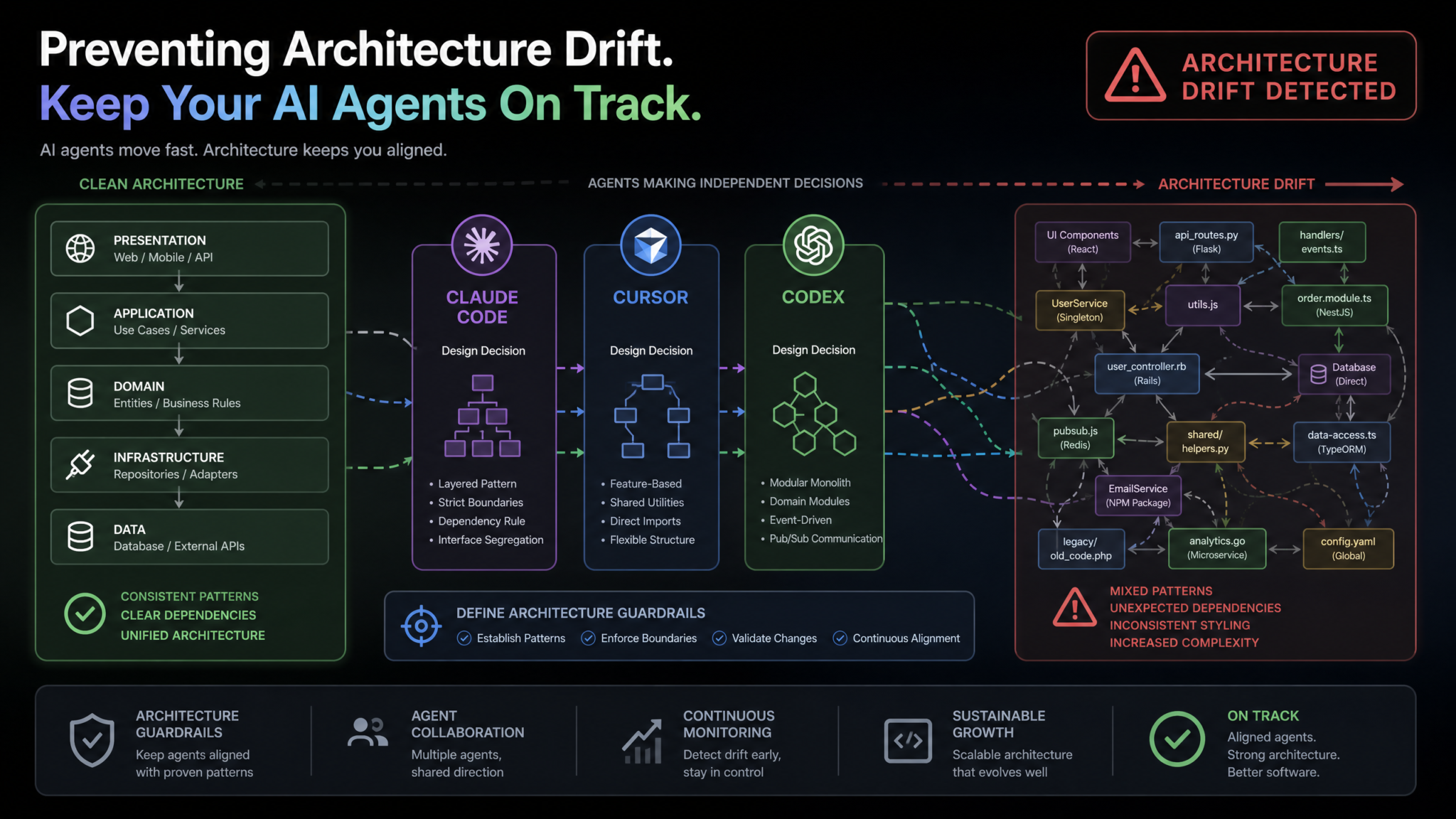
How to Manage Design Decisions When Using AI Coding Agents: Complete Guide to Preventing Architecture Drift with Claude Code, Cursor, and Codex
AI coding agents have fundamentally changed how software gets built. Claude Code, Cursor, and OpenAI Codex can write hundreds of lines of production-ready code in seconds, refactor entire modules before you finish your coffee, and autonomously resolve GitHub issues while you sleep. But this speed comes with a hidden cost that engineering teams are only now beginning to understand: architecture drift. When AI agents make design decisions without explicit guidance, they introduce patterns, dependencies, and structural choices that silently diverge from your intended architecture — often in ways that compound over time into serious technical debt.
This guide is a complete, hands-on walkthrough for engineering teams who rely on AI coding agents and need to maintain architectural integrity. You will learn how to configure project-level design documents, set up automated drift detection, build review workflows that catch violations before they merge, and enforce styling and dependency policies across every agent in your stack. Whether you are running Claude Code in an enterprise environment, using Cursor for solo development, or deploying Codex background tasks at scale, every technique here is immediately actionable.
Step 1: Understanding Architecture Drift
What Architecture Drift Actually Looks Like
Architecture drift is not a single catastrophic event. It is a gradual process in which individually reasonable AI decisions accumulate into a codebase that no longer reflects your team’s architectural vision. A 2024 survey by Sourcegraph found that 67% of engineering teams using AI coding assistants reported “unexpected structural changes” introduced by their tools within the first three months of adoption. That number climbs to 84% for teams using autonomous background agents like Codex Tasks.
The insidious thing about AI-induced drift is that each individual decision often looks defensible in isolation. The agent is not making mistakes — it is making locally optimal choices without global architectural context. Understanding the specific failure modes helps you build the right guardrails.
Pattern 1: New Design Pattern Introduction
Your codebase uses a repository pattern for data access. You ask Claude Code to add a caching layer to your user service. The agent, trained on millions of repositories, recognizes that the caching decorator pattern is common and efficient, so it implements @cache decorators directly on service methods rather than in the repository layer. The code works perfectly. But now you have two competing data-access patterns in a codebase that previously had one — and every future AI agent will learn from both patterns and perpetuate the inconsistency.
Pattern 2: CSS Framework Mixing
Your project uses Tailwind CSS with a strict set of design tokens. A Cursor agent helping with a complex UI component decides that a specific layout requires precise pixel control and reaches for inline styles. Another session adds a utility from a different utility-first library it found in your node_modules. Within two weeks, you have three styling approaches coexisting in production. Component isolation breaks down, your design system loses coherence, and theming becomes nearly impossible.
Pattern 3: Unauthorized Dependency Addition
This is perhaps the most operationally dangerous form of drift. AI agents frequently add npm packages, Python libraries, or Go modules to solve problems they encounter — even when equivalent functionality already exists in your codebase or approved dependency list. A Codex background task resolving a date-formatting issue might add date-fns to a project that already uses dayjs. Each new dependency is a supply chain risk, a bundle size increase, and a maintenance burden.
Pattern 4: File Structure Reorganization
Modern AI agents are opinionated about file organization. When asked to “clean up” or “refactor” code, they may move files to match common conventions they have seen in training data — moving components from a feature-based structure into a type-based structure, or reorganizing API routes in ways that break implicit import conventions in the rest of the codebase.
Pattern 5: State Management Fragmentation
Your frontend uses Zustand for global state. An agent working on a complex form decides that local React Context would be cleaner for that specific component tree. A later agent adds a small Redux slice for a feature it was helping build. You now have three state management solutions in a single frontend codebase — a common real-world outcome reported by teams using multiple AI agents across different sessions.
Why AI Agents Make These Decisions
Understanding the root cause matters because it shapes your mitigation strategy. AI coding agents do not have persistent memory of architectural decisions made in previous sessions (unless you provide it explicitly). They optimize for the immediate task. They draw on patterns from their training data, which includes an enormous variety of codebases with radically different architectural approaches. Without explicit constraints, every agent interaction is essentially a stateless conversation with a very capable but architecturally amnesiac developer.
The solution is not to use AI agents less — the productivity gains are too significant to forfeit. The solution is to make your architectural decisions as explicit, machine-readable, and accessible to agents as possible. Claude Code Project Configuration Best Practices
Step 2: Setting Up Design Guardrails with CLAUDE.md
What CLAUDE.md Is and How Claude Code Uses It
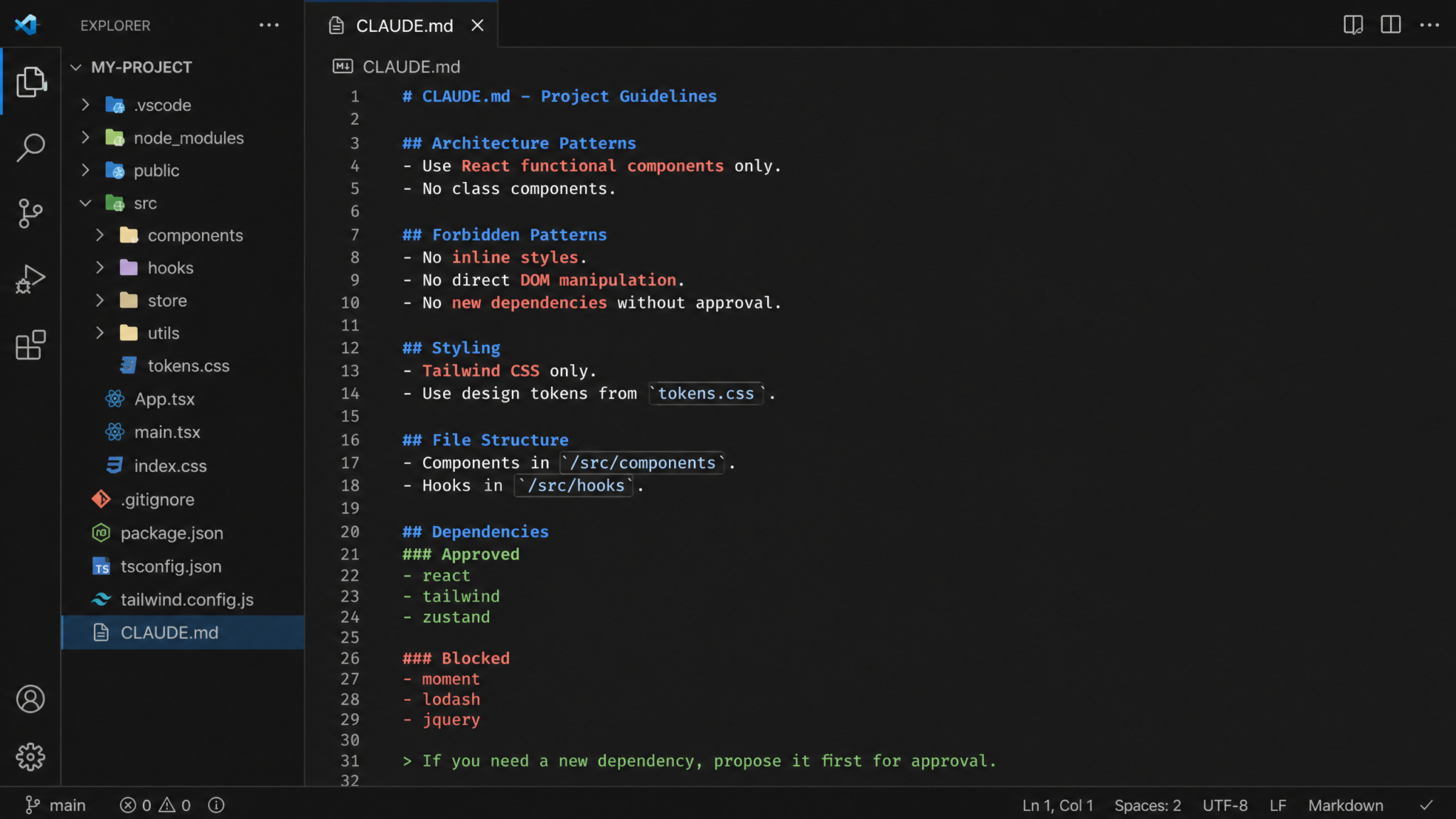
Claude Code reads a file called CLAUDE.md at the root of your repository (and optionally in subdirectories) before every session. This file functions as persistent context — it is the architectural briefing you give to every Claude Code session automatically, without having to repeat yourself. Think of it as your project’s architectural constitution: the rules that apply to every interaction, regardless of the specific task being performed.
A well-structured CLAUDE.md is the single highest-leverage configuration change you can make for controlling AI-induced architecture drift when using Claude Code. Teams that use detailed CLAUDE.md files report significantly fewer unauthorized pattern introductions than teams relying on per-session instructions.
Anatomy of an Effective CLAUDE.md
The file should cover six core areas: project overview, architecture patterns to follow, forbidden patterns, dependency policy, styling conventions, and file structure rules. Here is a production-ready example for a Next.js + TypeScript + Tailwind project:
# CLAUDE.md — Architectural Guidelines for myapp.dev

## Project Overview
This is a Next.js 14 App Router application using TypeScript (strict mode),
Tailwind CSS with custom design tokens, and Prisma + PostgreSQL for data.
The frontend communicates exclusively through tRPC. Authentication is handled
by NextAuth.js v5. DO NOT deviate from these core technology choices.

---

## Architecture Patterns — MUST FOLLOW

### Data Access
- ALL database access goes through Prisma service classes in `/src/server/services/`
- Service classes MUST follow the Repository pattern
- Direct Prisma client usage is ONLY permitted inside service classes
- Cache invalidation logic belongs in the service layer, NOT in API handlers

### API Layer
- Use tRPC procedures exclusively. Do NOT create REST endpoints with route handlers
  unless explicitly instructed and the reason is documented in a comment
- tRPC routers live in `/src/server/routers/`
- Input validation uses Zod — define schemas in `/src/shared/schemas/`

### State Management
- Global client state: Zustand stores in `/src/stores/`
- Server state: TanStack Query (already configured via tRPC)
- Local component state: React useState/useReducer
- DO NOT add React Context for state management (use Zustand instead)
- DO NOT add Redux, Jotai, Recoil, or any other state library

### Component Architecture
- Presentational components: `/src/components/ui/` — no data fetching allowed
- Feature components: `/src/components/features/` — may use tRPC hooks
- Page components live in `/src/app/` following Next.js App Router conventions
- Components use named exports (no default exports except page/layout files)

---

## FORBIDDEN PATTERNS — Never Do These

- Never use `any` in TypeScript. Use `unknown` with type narrowing if needed
- Never write inline styles. All styling uses Tailwind classes or CSS Modules
- Never import from `@prisma/client` outside of `/src/server/services/`
- Never add `useEffect` for data fetching — use tRPC query hooks
- Never use `var` — only `const` and `let`
- Never create barrel files (index.ts re-exports) — use direct imports
- Never add a new npm package without updating DECISIONS.md with justification

---

## Dependency Policy

### Approved Core Dependencies (DO NOT add alternatives)
- HTTP/API: tRPC (not REST, not GraphQL, not Axios for internal calls)
- Validation: Zod (not Joi, not Yup, not class-validator)
- Dates: date-fns (not moment, not dayjs, not luxon)
- Forms: React Hook Form (not Formik, not custom solutions)
- Testing: Vitest + React Testing Library (not Jest, not Cypress for unit tests)
- Icons: Lucide React (not Heroicons, not React Icons)

### Before Adding ANY New Dependency
1. Check if existing approved dependencies can solve the problem
2. Document the decision in DECISIONS.md
3. Get explicit user approval before running npm install
4. Never add dependencies marked as experimental or with <1000 weekly downloads

---

## Styling Conventions

### Tailwind Usage
- Use design tokens from `/src/styles/tokens.css` — custom properties are defined there
- Color classes: ONLY use the custom palette (brand-*, neutral-*, semantic-*)
- Do NOT use arbitrary Tailwind values (e.g., `w-[347px]`) — use spacing scale
- Responsive prefixes: mobile-first (sm:, md:, lg:, xl:)
- Animation: use the pre-defined animation classes in `/src/styles/animations.css`

### Component Variants
- Use `class-variance-authority` (cva) for component variants — already installed
- Do NOT use conditional string concatenation for class logic

---

## File Structure Rules

src/
├── app/              # Next.js App Router pages and layouts only
├── components/
│   ├── ui/           # Presentational, no data fetching
│   └── features/     # Feature-specific components
├── server/
│   ├── routers/      # tRPC routers
│   └── services/     # Database service classes
├── shared/
│   └── schemas/      # Zod schemas shared between client and server
├── stores/           # Zustand stores
├── hooks/            # Custom React hooks
└── lib/              # Third-party library configuration files

DO NOT create new top-level directories without explicit instruction.
DO NOT move existing files to different directories without explicit instruction.

---

## When You Are Uncertain

If a task requires a pattern not covered here, or you see a conflict between
requirements, STOP and ask for clarification before writing code. Document your
reasoning in a comment if you proceed with an architectural judgment call.
Subdirectory CLAUDE.md Files
Claude Code also reads CLAUDE.md files in subdirectories when working in those contexts. Use this for microservices or monorepo packages that have their own architectural rules. A packages/email-service/CLAUDE.md can specify patterns specific to that service without cluttering the root document.
Monorepo Configuration Strategies for AI Coding Tools
Step 3: Configuring .cursorrules for Cursor
How Cursor Reads .cursorrules
Cursor includes the contents of .cursorrules in every AI request made within that project. Unlike CLAUDE.md, which is formatted for human readability and Claude’s context window, .cursorrules is optimized for direct instruction. Cursor’s underlying models respond well to explicit, imperative statements. The file is plain text and sits at your project root.
Starting with Cursor 0.43, you can also define rules in .cursor/rules/*.mdc files for more granular control — scoping specific rules to specific file patterns. This is especially powerful for monorepos.
Full .cursorrules Example
# Cursor Rules — yourproject.io

## MANDATORY: Read Before Every Response

You are working on a React Native (Expo SDK 51) mobile application with
TypeScript strict mode. The backend is a Node.js/Fastify API deployed on
Railway. Do not suggest non-React Native solutions for mobile UI.

---

## CODING STANDARDS

TypeScript:
- Strict mode is enabled. Every function must have explicit return types.
- Prefer interfaces over type aliases for object shapes
- Use enums only for truly enumerated values — prefer union types otherwise
- No `as` type assertions without a comment explaining why it is safe
- Generics must be descriptive: use `TUser` not `T`

Naming Conventions:
- Components: PascalCase
- Hooks: camelCase starting with "use"
- Constants: SCREAMING_SNAKE_CASE
- Event handlers: camelCase starting with "handle" (handlePress, handleSubmit)
- Boolean variables: prefix with "is", "has", "can", "should"
- Files: match the primary export name exactly

---

## ARCHITECTURAL BOUNDARIES

Navigation:
- ALL navigation uses Expo Router file-based routing
- Do NOT use React Navigation imperatively — use Expo Router's Link and router
- Deep link configuration lives in app.json only

Data Fetching:
- Use TanStack Query for ALL server state
- Queries are defined in `/src/queries/` — one file per domain entity
- Mutations follow the same pattern in `/src/mutations/`
- Do NOT fetch in useEffect

Local State:
- Zustand for global client state — stores in `/src/stores/`
- useState for genuinely local UI state only
- Do NOT use Context API for state management

Styling:
- Use NativeWind (Tailwind for React Native) for ALL styling
- Do NOT use StyleSheet.create() for new components (existing ones may remain)
- Do NOT write inline style objects
- Spacing/sizing: use NativeWind's spacing scale, not arbitrary numbers

---

## COMPONENT PATTERNS

Screen components (in /src/app/) must:
- Be thin — delegate to feature components
- Handle navigation params and route-specific logic only
- Not contain business logic

Feature components (in /src/components/features/) must:
- Have a single responsibility
- Accept typed props — no prop drilling more than two levels (use Zustand)

UI components (in /src/components/ui/) must:
- Be fully presentational
- Accept an optional `testID` prop
- Have a corresponding story in /src/stories/ if they are reused in 3+ places

---

## IMPORT RESTRICTIONS

Forbidden imports in client-side code:
- `fs`, `path`, `crypto` (Node built-ins) — use Expo equivalents
- Direct database client — this is a mobile app
- Any package not in package.json — suggest before installing

Import order (enforced by ESLint — do not rearrange):
1. React and React Native core
2. Expo SDK packages
3. Third-party packages
4. Internal absolute imports (@/components, @/stores, etc.)
5. Relative imports

---

## BEFORE WRITING CODE

1. Confirm the task fits within these architectural rules
2. If a new pattern is required, STATE IT EXPLICITLY before implementing
3. If adding a dependency is necessary, LIST IT and wait for confirmation
4. Prefer modifying existing patterns over introducing new ones

---

## TESTING REQUIREMENTS

- New utility functions require a test in /src/__tests__/
- Test file name: [source-file].test.ts
- Use Jest + React Native Testing Library
- Mock Expo modules using jest-expo preset
- Test IDs on interactive elements use format: "component-name-action"
Scoped Rules with .cursor/rules/
For fine-grained control, create individual rule files with glob pattern matching:
# .cursor/rules/api-routes.mdc
---
globs: src/app/api/**/*.ts
---
All API routes must:
- Use Fastify schema validation with TypeBox
- Return consistent error shapes: { error: string, code: string, statusCode: number }
- Log using the shared logger from @/lib/logger
- Never expose Prisma errors directly to clients — map to user-safe messages
Step 4: Using Codex System Prompts to Constrain Background Tasks
The Unique Challenge of Autonomous Agents
Claude Code and Cursor operate interactively — you see the code before it is applied. Codex Tasks (and similar autonomous agents like GitHub Copilot Workspace) operate asynchronously in the background. They open PRs, resolve issues, and make commits while you are doing other things. This fundamentally changes the risk profile: architectural violations can reach a PR before any human has reviewed them.
For autonomous agents, your constraint strategy must be more aggressive. The goal is not just to guide the agent — it is to make architectural violations structurally impossible or immediately visible through automated checks.
Structuring Codex Task Instructions
Every Codex task should include three categories of system-level instructions: task scope boundaries, architectural constraints, and review triggers. Here is a production template:
CODEX TASK SYSTEM PROMPT TEMPLATE
===================================

## Task Scope — Read First

You are resolving GitHub Issue #[NUMBER] in the yourproject.io repository.
Your task scope is STRICTLY LIMITED to the specific problem described in the issue.
Do NOT:
- Refactor code outside files directly relevant to the issue
- "Clean up" or "improve" code that is not broken
- Update dependencies as a side effect of your changes
- Move files to "better" locations
- Introduce new patterns even if you believe they are superior

---

## Architecture Reference

Before writing any code, read CLAUDE.md in the repository root.
All constraints defined there apply to your work.

Key rules for this repository:
- Backend: Express + TypeScript. All routes in /src/routes/, services in /src/services/
- ORM: Prisma. No raw SQL except in approved migration files
- Validation: Zod. No other validation libraries
- Styling: Tailwind CSS only (frontend). No styled-components, no CSS Modules
- State: Redux Toolkit. No Context, no Zustand, no MobX

---

## Before Committing — Mandatory Checklist

Run these checks and ensure they pass before creating a PR:
1. npm run typecheck — zero TypeScript errors
2. npm run lint — zero ESLint errors
3. npm run test:affected — all tests pass
4. npm run audit:deps — no new unauthorized dependencies
5. git diff package.json package-lock.json — if this shows changes, STOP and add
   a PR comment explaining why the dependency change is necessary

---

## PR Description Requirements

Your PR description MUST include:
- Summary of what changed and why
- Files modified (list each file)
- Patterns used (confirm they match existing patterns or explain deviations)
- Dependencies added or removed (if any — requires justification)
- A section titled "Architectural Impact" describing any structural changes

---

## When You Are Stuck

If the issue cannot be resolved without:
- Adding a new dependency
- Introducing a new architectural pattern
- Modifying files outside the stated scope
- Making a design decision that is not covered by CLAUDE.md

...then CREATE THE PR with "NEEDS REVIEW" in the title and a comment explaining
the decision point. Do not make the architectural decision autonomously.
Environment-Level Constraints for Codex
Beyond prompt-level instructions, configure your repository’s Codex environment with scripts that act as automated gatekeepers:
# .codex/setup.sh — runs when Codex initializes the environment
#!/bin/bash
set -e

echo "Installing dependencies..."
npm ci

echo "Setting up architectural validation..."
cp .codex/pre-commit-hook .git/hooks/pre-commit
chmod +x .git/hooks/pre-commit

echo "Loading approved dependency manifest..."
cat .codex/approved-packages.json

echo "Environment ready. Architectural constraints active."
Step 5: Building a Design Decision Log
Why Tracking AI Decisions Matters
When a human developer makes a non-obvious design decision, they typically add a comment or update documentation. AI agents rarely do this without explicit instruction. Without a decision log, your team loses the “why” behind AI-introduced patterns — making it impossible to consistently extend or refactor them later.
A design decision log has two components: the DECISIONS.md file that serves as human-readable documentation, and automated tooling that detects when architectural changes have been made and prompts for documentation.
DECISIONS.md Structure
# Design Decision Log — yourproject.io

## Template for New Entries

### [DATE] — [SHORT TITLE]
**Status:** Proposed | Accepted | Deprecated | Superseded
**Context:** What situation required a decision?
**Decision:** What was decided?
**Consequences:** What are the trade-offs?
**AI Agent Involvement:** Was this decision made or suggested by an AI agent?
  If yes: Which agent, which session/task, and what was the original prompt?

---

## Active Decisions

### 2024-11-15 — Use tRPC Over REST for Internal API
**Status:** Accepted
**Context:** The frontend and backend are co-deployed and developed by the same team.
Type safety across the API boundary was a priority to reduce runtime errors.
**Decision:** All client-server communication uses tRPC with Zod input schemas.
REST endpoints are prohibited for internal calls.
**Consequences:** Strong type safety, excellent DX, but couples frontend/backend
more tightly. External API consumers would need REST or GraphQL in future.
**AI Agent Involvement:** No — human decision at project kickoff.

### 2024-12-03 — Zustand Over Context for Global State
**Status:** Accepted
**Context:** During a Cursor session, Claude suggested React Context for a
shopping cart feature. We evaluated the suggestion and chose Zustand instead
for better DevTools support and simpler async action handling.
**Decision:** Zustand is the only approved global state manager.
Context API is permitted for static configuration (theme, locale) only.
**Consequences:** Consistent state patterns, good performance, minimal boilerplate.
**AI Agent Involvement:** Yes — Cursor/Claude suggested Context; human overrode
with Zustand after evaluation. Added to .cursorrules to prevent recurrence.

### 2025-01-08 — Reject date-fns Addition (Codex Task #247)
**Status:** Rejected
**Context:** Codex Task #247 added date-fns while resolving an invoice date
formatting issue. The task correctly flagged it in the PR description.
**Decision:** Rejected. dayjs already handles this use case. Task was revised to
use dayjs's format() method.
**Consequences:** No new dependency. dayjs formatting docs added to CLAUDE.md.
**AI Agent Involvement:** Yes — Codex Tasks #247 initially added it; PR review
caught it; task was re-run with updated constraints.
Git Hooks for Detecting Architectural Changes
Automate the detection of architectural changes with a pre-commit hook that analyzes diffs and prompts for documentation when significant changes are detected:
Access 40,000+ AI Prompts for ChatGPT, Claude & Codex — Free!
Subscribe to get instant access to our complete Notion Prompt Library — the largest curated collection of prompts for ChatGPT, Claude, OpenAI Codex, and other leading AI models. Optimized for real-world workflows across coding, research, content creation, and business.
#!/bin/bash
# .git/hooks/pre-commit — Architectural Change Detection

STAGED_FILES=$(git diff --cached --name-only)
NEEDS_DECISION_LOG=false
REASONS=()

# Check for new dependencies
if echo "$STAGED_FILES" | grep -q "package.json"; then
  NEW_DEPS=$(git diff --cached package.json | grep "^+" | grep -v "^+++" | grep -v "version" | grep -E '"[^"]+": "[^"]+"')
  if [ -n "$NEW_DEPS" ]; then
    NEEDS_DECISION_LOG=true
    REASONS+=("New dependencies detected in package.json")
    echo "$NEW_DEPS"
  fi
fi

# Check for new directories (potential structural changes)
NEW_DIRS=$(git diff --cached --name-only | xargs -I{} dirname {} | sort -u | while read dir; do
  if [ ! -d "$dir" ] 2>/dev/null; then echo "$dir"; fi
done)
if [ -n "$NEW_DIRS" ]; then
  NEEDS_DECISION_LOG=true
  REASONS+=("New directory structure detected: $NEW_DIRS")
fi

# Check for new configuration files (new tools/patterns)
CONFIG_FILES=$(echo "$STAGED_FILES" | grep -E "\.(config\.|rc\.|\.toml$|\.ini$)" | grep -v "^#")
if [ -n "$CONFIG_FILES" ]; then
  NEEDS_DECISION_LOG=true
  REASONS+=("New configuration files: $CONFIG_FILES")
fi

# Check for new state management patterns
STATE_PATTERNS=$(git diff --cached | grep "^+" | grep -E "(createSlice|createStore|atom\(|create\(.*zustand|useReducer.*context)")
if [ -n "$STATE_PATTERNS" ]; then
  NEEDS_DECISION_LOG=true
  REASONS+=("Possible new state management pattern detected")
fi

if [ "$NEEDS_DECISION_LOG" = true ]; then
  echo ""
  echo "⚠️  ARCHITECTURAL CHANGE DETECTED"
  echo "=================================="
  for reason in "${REASONS[@]}"; do
    echo "  → $reason"
  done
  echo ""
  echo "Please ensure DECISIONS.md has been updated before committing."
  echo "If this change was made by an AI agent, document it with:"
  echo "  - Which agent made the change"
  echo "  - Why the change was accepted"
  echo ""
  read -p "Has DECISIONS.md been updated? (y/N): " CONFIRMED
  if [ "$CONFIRMED" != "y" ] && [ "$CONFIRMED" != "Y" ]; then
    echo "Commit aborted. Update DECISIONS.md and recommit."
    exit 1
  fi
fi

exit 0
Automated Diff Analysis for Design Reviews
For teams using CI/CD, a more sophisticated analysis script can run on every PR and generate a design impact report:
#!/usr/bin/env node
// scripts/analyze-architectural-diff.mjs
// Run: node scripts/analyze-architectural-diff.mjs <base-branch>

import { execSync } from 'child_process';
import { readFileSync, writeFileSync } from 'fs';

const baseBranch = process.argv[2] || 'main';

const diff = execSync(`git diff origin/${baseBranch}...HEAD --name-only`).toString();
const changedFiles = diff.trim().split('\n').filter(Boolean);

const report = {
  timestamp: new Date().toISOString(),
  baseBranch,
  findings: [],
  riskLevel: 'LOW'
};

// Check for dependency changes
const packageChanged = changedFiles.includes('package.json');
const lockfileChanged = changedFiles.includes('package-lock.json');

if (packageChanged) {
  const packageDiff = execSync(`git diff origin/${baseBranch}...HEAD -- package.json`).toString();
  const addedDeps = [...packageDiff.matchAll(/^\+\s+"([^"]+)":\s+"([^"]+)"/gm)]
    .filter(m => !m[0].includes('version'));

  if (addedDeps.length > 0) {
    report.findings.push({
      type: 'NEW_DEPENDENCY',
      severity: 'HIGH',
      details: addedDeps.map(m => `${m[1]}@${m[2]}`),
      action: 'Review against approved-packages.json. Requires DECISIONS.md entry.'
    });
    report.riskLevel = 'HIGH';
  }
}

// Check for new directories
const newDirs = [...new Set(changedFiles.map(f => f.split('/')[0] + '/' + f.split('/')[1]))]
  .filter(d => d.includes('/'));

report.findings.push({
  type: 'FILE_STRUCTURE',
  severity: 'INFO',
  details: changedFiles.filter(f => f.includes('/')).slice(0, 20),
  action: 'Verify file placement matches CLAUDE.md structure rules.'
});

// Output report
const reportPath = 'architectural-diff-report.json';
writeFileSync(reportPath, JSON.stringify(report, null, 2));

console.log('\n📊 ARCHITECTURAL DIFF REPORT');
console.log('============================');
console.log(`Risk Level: ${report.riskLevel}`);
report.findings.forEach(f => {
  console.log(`\n[${f.severity}] ${f.type}`);
  f.details.forEach(d => console.log(`  - ${d}`));
  console.log(`  Action: ${f.action}`);
});
Automated Code Review Configuration for Engineering Teams
Step 6: Review Workflows to Catch Drift
The Four-Layer Review System
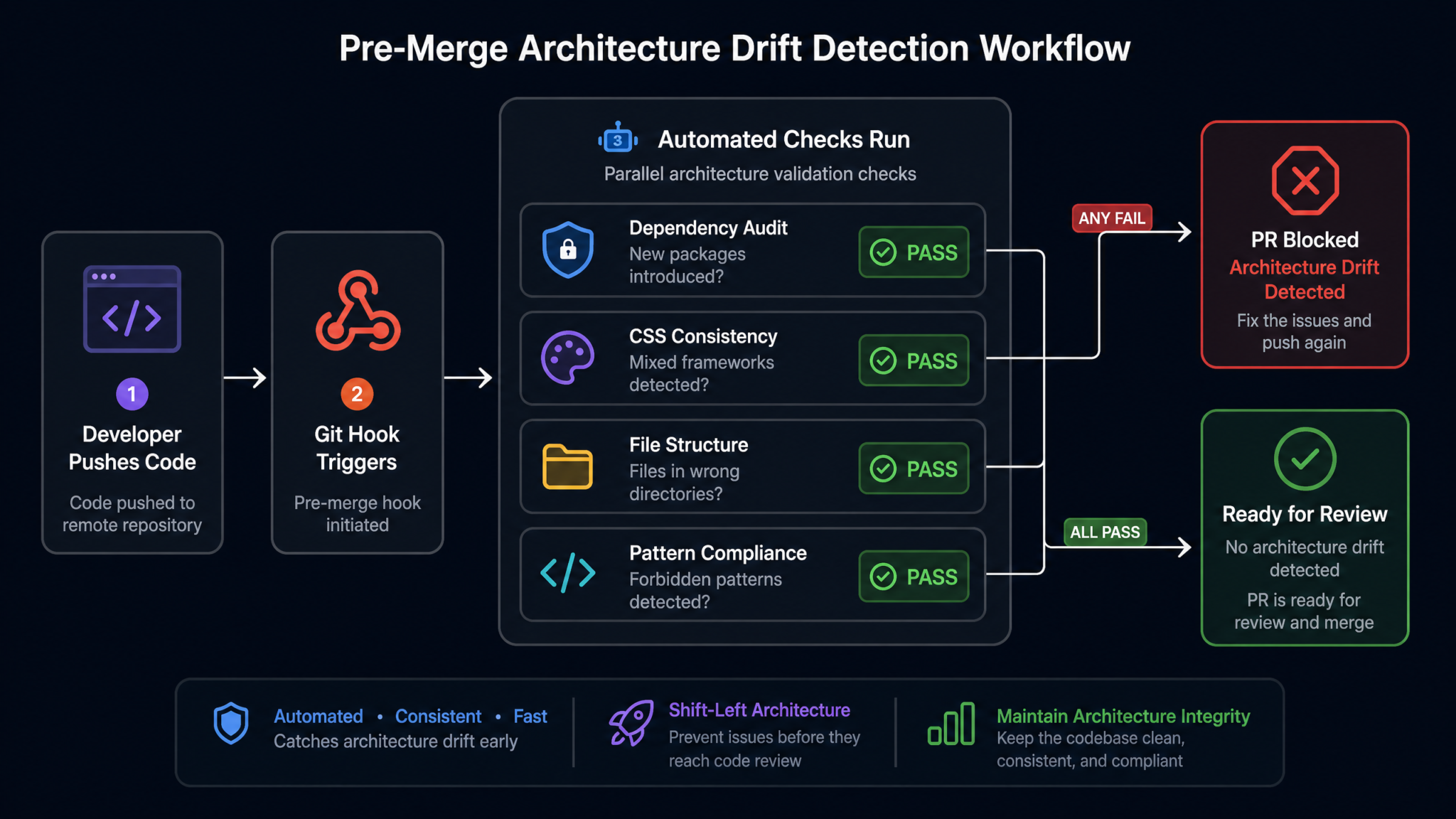
Catching architectural drift requires checks at four distinct stages: pre-commit (local), PR creation (automated CI), PR review (human-assisted tooling), and post-merge monitoring. Each layer catches different categories of violations. Relying on any single layer creates gaps.
Layer 1: Pre-Commit ESLint Architecture Rules
ESLint can enforce architectural boundaries that go far beyond syntax. The eslint-plugin-boundaries package allows you to define allowed import relationships between architectural layers:
// .eslintrc.cjs — Architectural Boundary Enforcement

module.exports = {
  plugins: ['boundaries', 'import'],
  settings: {
    'boundaries/elements': [
      { type: 'app', pattern: 'src/app/**' },
      { type: 'features', pattern: 'src/components/features/**' },
      { type: 'ui', pattern: 'src/components/ui/**' },
      { type: 'stores', pattern: 'src/stores/**' },
      { type: 'services', pattern: 'src/server/services/**' },
      { type: 'routers', pattern: 'src/server/routers/**' },
      { type: 'schemas', pattern: 'src/shared/schemas/**' },
      { type: 'hooks', pattern: 'src/hooks/**' },
    ]
  },
  rules: {
    'boundaries/element-types': ['error', {
      default: 'disallow',
      rules: [
        // UI components cannot import from features or stores
        { from: 'ui', allow: ['ui', 'hooks'] },
        // Features can import ui, stores, hooks, schemas
        { from: 'features', allow: ['ui', 'features', 'stores', 'hooks', 'schemas'] },
        // App layer can use everything client-side
        { from: 'app', allow: ['features', 'ui', 'stores', 'hooks', 'schemas'] },
        // Routers can only use services and schemas
        { from: 'routers', allow: ['services', 'schemas'] },
        // Services can only use schemas (no circular deps)
        { from: 'services', allow: ['schemas'] },
      ]
    }],
    // Prevent importing from @prisma/client outside services
    'no-restricted-imports': ['error', {
      paths: [],
      patterns: [
        {
          group: ['@prisma/client'],
          importNames: ['PrismaClient'],
          message: 'Direct PrismaClient usage is only allowed in src/server/services/'
        }
      ]
    }]
  }
};
Layer 2: CI Dependency Audit Workflow
# .github/workflows/architectural-review.yml

name: Architectural Review

on:
  pull_request:
    branches: [main, develop]

jobs:
  dependency-audit:
    runs-on: ubuntu-latest
    name: Dependency Compliance Check
    steps:
      - uses: actions/checkout@v4
        with:
          fetch-depth: 0

      - name: Check for unauthorized dependencies
        run: |
          # Load approved packages list
          APPROVED=$(cat .architectural/approved-packages.json | jq -r '.approved[]')

          # Get newly added dependencies
          ADDED=$(git diff origin/main...HEAD -- package.json | \
            grep "^+" | grep -v "^+++" | \
            grep -E '"dependencies"|"devDependencies"' -A 100 | \
            grep -E '^\+\s+"[^"]+"' | \
            sed 's/.*"\([^"]*\)".*/\1/')

          VIOLATIONS=""
          while IFS= read -r dep; do
            if ! echo "$APPROVED" | grep -q "^${dep}$"; then
              VIOLATIONS="${VIOLATIONS}\n  - ${dep}"
            fi
          done <<< "$ADDED"

          if [ -n "$VIOLATIONS" ]; then
            echo "❌ UNAUTHORIZED DEPENDENCIES DETECTED"
            echo -e "$VIOLATIONS"
            echo ""
            echo "Add justification to DECISIONS.md and update approved-packages.json"
            echo "before this PR can merge."
            exit 1
          fi

          echo "✅ All dependencies are in the approved list."

  lint-architecture:
    runs-on: ubuntu-latest
    name: Architecture Lint
    steps:
      - uses: actions/checkout@v4
      - uses: actions/setup-node@v4
        with:
          node-version: '20'
          cache: 'npm'
      - run: npm ci
      - run: npm run lint -- --max-warnings 0
      - run: npm run typecheck

  css-consistency:
    runs-on: ubuntu-latest
    name: Styling Consistency Check
    steps:
      - uses: actions/checkout@v4
      - uses: actions/setup-node@v4
        with:
          node-version: '20'
          cache: 'npm'
      - run: npm ci
      - name: Check for inline styles
        run: |
          VIOLATIONS=$(grep -rn "style={{" src/components/ --include="*.tsx" | \
            grep -v "// architectural-exception" | wc -l)
          if [ "$VIOLATIONS" -gt "0" ]; then
            echo "❌ $VIOLATIONS inline style(s) found. Use Tailwind classes."
            grep -rn "style={{" src/components/ --include="*.tsx" | \
              grep -v "// architectural-exception"
            exit 1
          fi
          echo "✅ No inline styles found."
      - name: Check for mixed styling approaches
        run: node scripts/check-styling-consistency.mjs
Layer 3: PR Review Checklist Automation
Configure a GitHub Actions workflow to automatically add a design review checklist to every PR that contains architectural changes:
# .github/workflows/pr-design-checklist.yml
name: Design Review Checklist

on:
  pull_request:
    types: [opened, synchronize]

jobs:
  add-checklist:
    runs-on: ubuntu-latest
    permissions:
      pull-requests: write
    steps:
      - uses: actions/checkout@v4
        with:
          fetch-depth: 0

      - name: Detect architectural changes
        id: detect
        run: |
          CHANGED=$(git diff origin/main...HEAD --name-only)
          HAS_ARCH_CHANGES=false

          echo "$CHANGED" | grep -qE "(package\.json|\.cursorrules|CLAUDE\.md|src/stores/|src/server/)" \
            && HAS_ARCH_CHANGES=true

          echo "has_arch_changes=$HAS_ARCH_CHANGES" >> $GITHUB_OUTPUT

      - name: Add design review comment
        if: steps.detect.outputs.has_arch_changes == 'true'
        uses: actions/github-script@v7
        with:
          script: |
            github.rest.issues.createComment({
              issue_number: context.issue.number,
              owner: context.repo.owner,
              repo: context.repo.repo,
              body: `## 🏗️ Architectural Review Required

This PR contains changes to architectural files. Please verify:

**Dependencies**
- [ ] No new packages added without DECISIONS.md entry
- [ ] All new packages are in \`.architectural/approved-packages.json\`
- [ ] No duplicate functionality with existing dependencies

**Patterns**
- [ ] New patterns align with \`CLAUDE.md\` specifications
- [ ] No new state management approaches introduced
- [ ] Import boundaries respected (ESLint boundaries check passed)

**Styling**
- [ ] Only Tailwind CSS used (no inline styles, no CSS Modules in new components)
- [ ] Design tokens used for colors/spacing (no arbitrary values)

**Structure**
- [ ] Files placed in correct directories per \`CLAUDE.md\`
- [ ] No new top-level directories without approval

**Documentation**
- [ ] \`DECISIONS.md\` updated for any non-trivial architectural choices
- [ ] AI agent involvement documented if applicable`
            })
Step 7: Managing CSS and Styling Consistency
Why Styling Is Especially Vulnerable to AI Drift
CSS and styling decisions are among the most frequently violated architectural boundaries in AI-assisted codebases. There are several reasons for this. First, styling problems often present as one-off cases where an agent reaches for whatever solution fits the immediate need. Second, AI agents are trained on an enormous variety of styling approaches — CSS Modules, styled-components, Tailwind, CSS-in-JS, Sass — and without clear constraints, they treat these as interchangeable. Third, styling violations are less visually obvious in code reviews than structural changes, making them easy to miss.
A systematic approach to styling consistency requires tooling at every level: configuration files, ESLint plugins, and CI checks. Tailwind CSS Design System Architecture Patterns
Enforcing Design Tokens
Design tokens are the foundation of a consistent design system. When AI agents use raw color values or arbitrary spacing, they bypass your design system and create visual inconsistencies that accumulate over time. Configure Tailwind to expose only your design tokens:
// tailwind.config.ts — Design Token Enforcement

import type { Config } from 'tailwindcss';

const config: Config = {
  content: ['./src/**/*.{ts,tsx}'],
  // Disable default color palette — force use of design tokens only
  theme: {
    // Replace (not extend) colors with design tokens only
    colors: {
      transparent: 'transparent',
      current: 'currentColor',
      // Brand palette
      'brand-50': 'var(--color-brand-50)',
      'brand-100': 'var(--color-brand-100)',
      'brand-500': 'var(--color-brand-500)',
      'brand-900': 'var(--color-brand-900)',
      // Semantic colors
      'success': 'var(--color-success)',
      'warning': 'var(--color-warning)',
      'error': 'var(--color-error)',
      'info': 'var(--color-info)',
      // Neutrals
      'neutral-0': 'var(--color-neutral-0)',
      'neutral-100': 'var(--color-neutral-100)',
      'neutral-900': 'var(--color-neutral-900)',
    },
    spacing: {
      // Use 4px base grid — no arbitrary values allowed in components
      '0': '0',
      '1': '4px',
      '2': '8px',
      '3': '12px',
      '4': '16px',
      '5': '20px',
      '6': '24px',
      '8': '32px',
      '10': '40px',
      '12': '48px',
      '16': '64px',
      '20': '80px',
      '24': '96px',
    },
    extend: {
      fontFamily: {
        sans: ['var(--font-inter)', 'system-ui', 'sans-serif'],
        mono: ['var(--font-jetbrains-mono)', 'monospace'],
      }
    }
  },
  // Disallow arbitrary values globally
  corePlugins: {
    // Keep all defaults
  }
};

export default config;
Automated Styling Violation Detection
#!/usr/bin/env node
// scripts/check-styling-consistency.mjs

import { readdirSync, readFileSync, statSync } from 'fs';
import { join, extname } from 'path';

const violations = [];

function scanDirectory(dir) {
  const entries = readdirSync(dir);
  for (const entry of entries) {
    const fullPath = join(dir, entry);
    if (statSync(fullPath).isDirectory() && !entry.startsWith('.') && entry !== 'node_modules') {
      scanDirectory(fullPath);
    } else if (['.tsx', '.jsx', '.ts', '.js'].includes(extname(entry))) {
      checkFile(fullPath);
    }
  }
}

function checkFile(filePath) {
  const content = readFileSync(filePath, 'utf-8');
  const lines = content.split('\n');

  lines.forEach((line, index) => {
    const lineNum = index + 1;

    // Detect inline styles (with exception marker support)
    if (line.includes('style={{') && !line.includes('// ok: dynamic-style')) {
      violations.push({
        file: filePath,
        line: lineNum,
        type: 'INLINE_STYLE',
        code: line.trim(),
        message: 'Use Tailwind classes instead of inline styles'
      });
    }

    // Detect StyleSheet.create (React Native projects)
    if (line.includes('StyleSheet.create') && !filePath.includes('/legacy/')) {
      violations.push({
        file: filePath,
        line: lineNum,
        type: 'STYLESHEET_CREATE',
        code: line.trim(),
        message: 'Use NativeWind classes. StyleSheet.create is deprecated in new code.'
      });
    }

    // Detect hardcoded hex colors in className strings
    const hexInClass = line.match(/className=.*#[0-9A-Fa-f]{3,6}/);
    if (hexInClass) {
      violations.push({
        file: filePath,
        line: lineNum,
        type: 'HARDCODED_COLOR',
        code: line.trim(),
        message: 'Use design token color classes instead of hex values'
      });
    }

    // Detect arbitrary Tailwind values
    const arbitraryValue = line.match(/\[(\d+px|\d+rem|#[0-9A-Fa-f]+)\]/);
    if (arbitraryValue && !line.includes('// ok: arbitrary')) {
      violations.push({
        file: filePath,
        line: lineNum,
        type: 'ARBITRARY_TAILWIND',
        code: line.trim(),
        message: `Arbitrary Tailwind value [${arbitraryValue[1]}] — use design tokens`
      });
    }
  });
}

scanDirectory('./src');

if (violations.length > 0) {
  console.error(`\n❌ STYLING VIOLATIONS FOUND: ${violations.length}\n`);
  violations.forEach(v => {
    console.error(`${v.file}:${v.line}`);
    console.error(`  Type: ${v.type}`);
    console.error(`  Message: ${v.message}`);
    console.error(`  Code: ${v.code}\n`);
  });
  process.exit(1);
} else {
  console.log('✅ Styling consistency check passed.');
}
Component Library Compliance
If your project uses a component library (shadcn/ui, Radix, Material UI), enforce that AI agents use your abstracted components rather than reimplementing primitives. Add these rules to both CLAUDE.md and .cursorrules:
# Component Library Compliance Rules (add to CLAUDE.md)
## Using Existing UI Components
Before creating any new UI element, check /src/components/ui/ for existing components.
Available components that MUST be used (do not reimplement these):
- Button variants → use `