
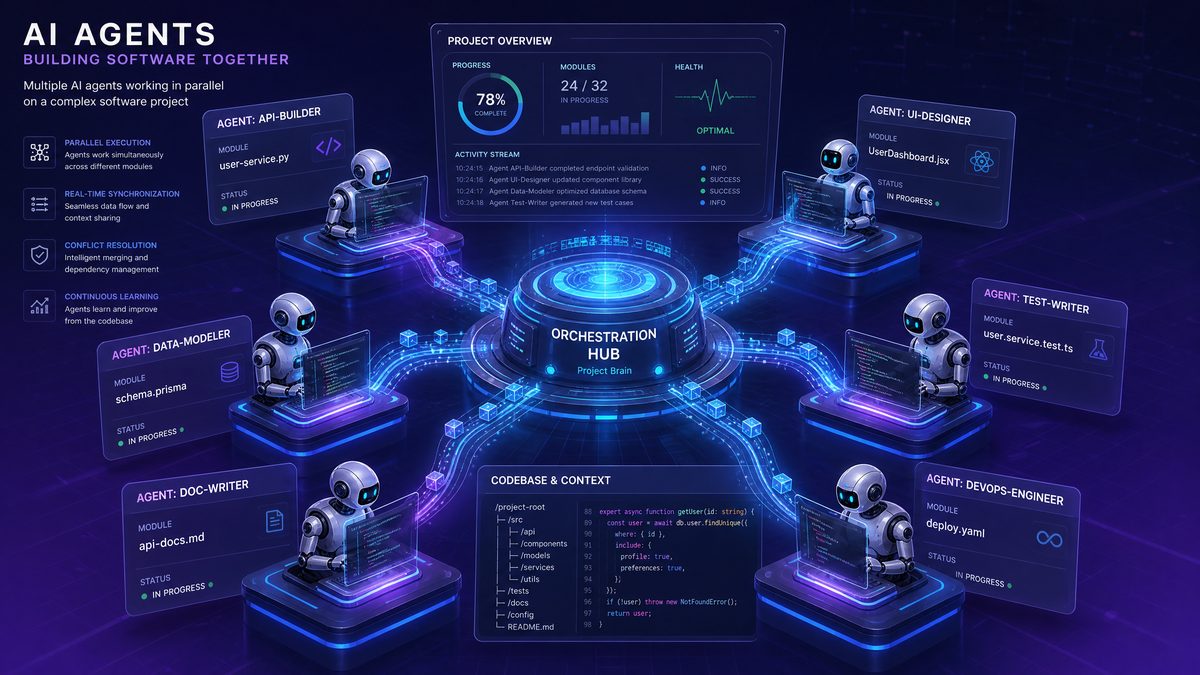
How to Build Multi-Agent Parallel Workflows in Codex Desktop: Complete Architecture Guide
By the ChatGPT AI Hub Editorial Team
Modern software development rarely happens in a straight line. Features get built while bugs get fixed, migrations run alongside refactoring efforts, and code reviews happen in parallel with new development. For years, this inherent parallelism in software work has been poorly served by single-threaded AI coding assistants that force you to work sequentially through tasks that could — and should — run simultaneously.
Codex Desktop’s multi-agent parallel execution architecture changes that calculus entirely. Instead of queuing tasks and waiting for one AI session to complete before starting another, you can now orchestrate multiple specialized agents working concurrently across your codebase, each focused on a discrete concern, all contributing toward a unified outcome. The result is a fundamentally different development velocity — and a fundamentally different way of thinking about AI-assisted engineering.
This guide is a complete architectural walkthrough for senior developers and engineering leads who want to move beyond single-agent workflows and harness the full power of Codex Desktop’s parallel execution model. We’ll cover task decomposition theory, agent coordination patterns, conflict detection and resolution, output merging strategies, and production-grade configuration examples you can adapt immediately.
Understanding the Codex Desktop Multi-Agent Execution Model
Before writing a single line of configuration, it’s essential to understand what “multi-agent parallel execution” actually means in the context of Codex Desktop — because the term gets used loosely across the industry, and the implementation details matter enormously for how you architect your workflows.
In Codex Desktop, each agent is an isolated execution context that maintains its own:
- Working memory: The agent’s current understanding of the files it has read, the task it has been assigned, and the decisions it has made
- File system scope: A defined set of files and directories the agent is permitted to read and write
- Tool access: The specific tools (shell execution, file editing, search, test running) available to that agent instance
- Task context: The instructions, constraints, and success criteria provided at initialization
Agents run in parallel by default when launched as part of a workflow definition. They do not share memory — there is no global state that one agent can corrupt by writing to it while another agent reads from it. Communication between agents happens through a defined coordination layer, which we’ll explore in depth, not through shared mutable state.
This isolation-first design is what makes Codex Desktop’s multi-agent model genuinely production-safe, rather than a demo feature that falls apart on real codebases. The tradeoff is that coordination requires explicit design — agents don’t automatically know what their siblings are doing. That’s not a bug; it’s the architectural guarantee that makes parallel execution reliable.
The Three Execution Phases
Every multi-agent workflow in Codex Desktop moves through three distinct phases:
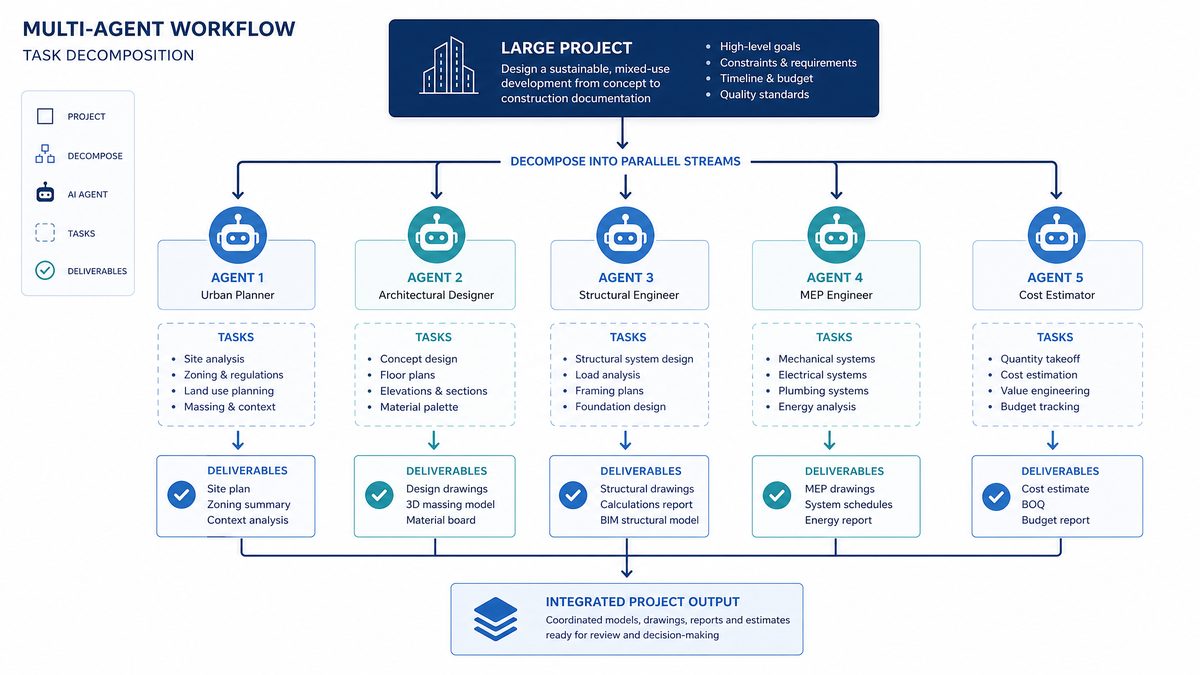
- Decomposition Phase: The orchestrator (either a dedicated orchestrator agent or the workflow definition itself) breaks the overall task into discrete, parallelizable subtasks and assigns them to individual agents with scoped permissions and instructions.
- Parallel Execution Phase: Assigned agents work simultaneously within their defined scopes. This is where the actual performance gain occurs — wall-clock time drops dramatically when eight agents work in parallel rather than sequentially.
- Merge Phase: Agent outputs are collected, conflict-checked, and merged into the target branch or output artifact. Conflicts are surfaced for human review or resolved automatically according to merge strategy configuration.
Understanding these phases is critical because different architectural decisions apply to each one. Let’s work through each in detail.
Phase 1: Task Decomposition — The Architecture That Determines Everything
The quality of your task decomposition determines the quality of your parallel workflow more than any other factor. Poor decomposition leads to agent conflicts, redundant work, and merge nightmares. Good decomposition leads to clean, independent work streams that merge without friction.
The Four Properties of a Well-Decomposed Task
Before assigning any task to an agent, evaluate it against these four properties:
| Property | Definition | Test Question |
|---|---|---|
| Bounded | The task has a clear start state and end state | Can I write a test that definitively passes when this task is complete? |
| Independent | The task does not require output from another parallel agent to proceed | Would this agent block if another agent were paused indefinitely? |
| Scoped | The task operates on a defined, non-overlapping set of files | Does the file scope of this task intersect with any other parallel agent’s scope? |
| Verifiable | The task has automated verification criteria | Can the merge phase automatically validate this agent’s output? |
Decomposition Patterns by Workflow Type
Different development workflows decompose naturally along different axes. Here are the primary patterns you’ll use:
Feature Development: Decompose by Layer
When building a new feature, decompose by architectural layer. A new user authentication system, for example, decomposes cleanly into:
- Agent A: Database schema and migrations (
db/migrations/) - Agent B: Backend service layer and business logic (
src/services/auth/) - Agent C: API endpoint handlers (
src/api/auth/) - Agent D: Frontend components and state management (
src/components/auth/,src/store/auth/) - Agent E: Test suite generation (
tests/auth/)
Each layer is genuinely independent during implementation — the service layer can be written against a defined interface even before the database migration is complete, because the interface contract is established in the decomposition phase, not discovered during execution.
Large-Scale Refactoring: Decompose by Module
When refactoring a large codebase — say, migrating from callbacks to async/await, or replacing a deprecated library — decompose by module or package boundary:
- Agent A:
src/modules/billing/ - Agent B:
src/modules/users/ - Agent C:
src/modules/notifications/ - Agent D:
src/modules/reporting/
The key is that module boundaries in a well-structured codebase correspond to minimal inter-module dependencies. Each agent can complete its refactoring independently, and integration points are handled in the merge phase.
Database Migrations: Decompose by Table Group
For complex database migrations involving many tables, decompose by table dependency group — tables that reference each other must be in the same agent’s scope, but independent table clusters can be migrated in parallel:
# Example: Decomposing a 40-table migration into parallel agents

Agent A (User domain):
  - users
  - user_profiles
  - user_preferences
  - user_sessions

Agent B (Product domain):
  - products
  - product_variants
  - product_categories
  - product_inventory

Agent C (Order domain):
  - orders
  - order_items
  - order_status_history
  - fulfillment_records

Agent D (Analytics domain):
  - events
  - sessions
  - conversion_funnels
  - attribution_data
Code Review: Decompose by Concern
For automated code review workflows, decompose by review concern rather than by file — multiple agents review the same files but look for different things:
- Agent A: Security vulnerabilities and injection risks
- Agent B: Performance bottlenecks and algorithmic complexity
- Agent C: Test coverage gaps and edge cases
- Agent D: API contract consistency and documentation accuracy
- Agent E: Dependency license compliance and version conflicts
This is a case where agents share read access to the same files but produce non-conflicting outputs (review comments) rather than file modifications. The merge phase here is aggregation, not conflict resolution.
Phase 2: Configuring and Launching Parallel Agents in Codex Desktop
With a solid decomposition plan in hand, you’re ready to configure your workflow definition. Codex Desktop uses a YAML-based workflow specification format that defines agents, their scopes, their instructions, and their coordination rules.
The Workflow Definition File
Here’s a complete, production-grade workflow definition for a feature development scenario — building a payment processing integration across all architectural layers simultaneously:
workflow:
  name: "payment-integration-feature"
  version: "1.0"
  description: "Parallel implementation of Stripe payment processing integration"

  # Global context available to all agents
  context:
    repository: "."
    base_branch: "main"
    feature_branch: "feature/stripe-payment-integration"
    shared_interfaces: "docs/interfaces/payment-api-spec.yaml"

  # Coordination configuration
  coordination:
    strategy: "interface-first"
    conflict_resolution: "semantic-merge"
    human_review_required: true
    auto_merge_threshold: 0.95

  agents:
    - id: "schema-agent"
      name: "Database Schema Agent"
      model: "codex-1"
      scope:
        read:
          - "db/schema.rb"
          - "db/migrations/"
          - "docs/interfaces/payment-api-spec.yaml"
        write:
          - "db/migrations/"
          - "db/schema.rb"
      instructions: |
        Create database migrations for the Stripe payment integration.
        Required tables: payment_methods, payment_intents, payment_events.
        Follow existing migration conventions in db/migrations/.
        Reference the interface spec for field definitions.
        Ensure all foreign keys and indexes are properly defined.
      success_criteria:
        - "All migrations run without errors: bundle exec rake db:migrate"
        - "Schema includes all fields defined in payment-api-spec.yaml"

    - id: "service-agent"
      name: "Payment Service Layer Agent"
      model: "codex-1"
      scope:
        read:
          - "app/services/"
          - "docs/interfaces/payment-api-spec.yaml"
          - "config/initializers/stripe.rb"
          - "Gemfile"
        write:
          - "app/services/payments/"
      instructions: |
        Implement the PaymentService class and supporting service objects.
        Implement: PaymentService, PaymentIntentService, WebhookProcessorService.
        Use the Stripe Ruby gem. Handle all error cases defined in the spec.
        Write clean, testable service objects following existing patterns in app/services/.
        Do not modify any files outside app/services/payments/.
      success_criteria:
        - "All service classes implement the interfaces in payment-api-spec.yaml"
        - "No syntax errors: bundle exec ruby -c app/services/payments/*.rb"

    - id: "api-agent"
      name: "API Controller Agent"
      model: "codex-1"
      scope:
        read:
          - "app/controllers/"
          - "config/routes.rb"
          - "docs/interfaces/payment-api-spec.yaml"
          - "app/serializers/"
        write:
          - "app/controllers/api/v1/payments_controller.rb"
          - "app/serializers/payment_serializer.rb"
          - "config/routes.rb"
      instructions: |
        Implement the payments API controller and routes.
        Endpoints required: POST /payments, GET /payments/:id, POST /payments/:id/confirm.
        Add webhook endpoint: POST /webhooks/stripe.
        Follow existing controller patterns. Use strong parameters.
        Add routes following the existing namespace conventions.
      success_criteria:
        - "Routes file parses without errors: bundle exec rake routes"
        - "Controller follows existing authentication patterns"

    - id: "frontend-agent"
      name: "Frontend Components Agent"
      model: "codex-1"
      scope:
        read:
          - "src/components/"
          - "src/store/"
          - "src/api/"
          - "docs/interfaces/payment-api-spec.yaml"
          - "package.json"
        write:
          - "src/components/payments/"
          - "src/store/payments.ts"
          - "src/api/payments.ts"
      instructions: |
        Implement React payment components and Redux state management.
        Components required: PaymentForm, PaymentMethodSelector, PaymentConfirmation.
        Implement Redux slice for payment state.
        Implement API client functions matching the backend spec.
        Use TypeScript. Follow existing component patterns.
      success_criteria:
        - "TypeScript compilation succeeds: npx tsc --noEmit"
        - "Components match interface spec field names exactly"

    - id: "test-agent"
      name: "Test Suite Agent"
      model: "codex-1"
      scope:
        read:
          - "spec/"
          - "tests/"
          - "docs/interfaces/payment-api-spec.yaml"
          - "app/services/payments/"
          - "app/controllers/"
          - "src/components/payments/"
        write:
          - "spec/services/payments/"
          - "spec/controllers/api/v1/payments_controller_spec.rb"
          - "tests/components/payments/"
      instructions: |
        Write comprehensive test suites for the payment integration.
        Cover: unit tests for all service methods, controller request specs,
        React component tests using React Testing Library.
        Include edge cases: failed payments, network errors, webhook validation.
        Aim for >90% coverage of the new payment code.
      success_criteria:
        - "All generated tests are syntactically valid"
        - "Test files follow existing spec conventions"
Launching the Workflow
With the workflow definition saved as codex-workflows/payment-integration.yaml, launching parallel execution is straightforward:
# Launch all agents in parallel
codex workflow run codex-workflows/payment-integration.yaml

# Launch with verbose output to monitor agent progress
codex workflow run codex-workflows/payment-integration.yaml --verbose

# Launch specific agents only (useful for resuming partial runs)
codex workflow run codex-workflows/payment-integration.yaml \
  --agents schema-agent,service-agent

# Dry run to validate configuration before execution
codex workflow run codex-workflows/payment-integration.yaml --dry-run
Monitoring Parallel Agent Progress
Codex Desktop provides a real-time dashboard view when running multi-agent workflows. Each agent’s status is tracked independently:
# Check workflow status
codex workflow status payment-integration-feature

# Output:
# Workflow: payment-integration-feature
# Status: RUNNING (4 of 5 agents active)
# Started: 2024-01-15 14:23:01
# Elapsed: 00:08:34
#
# Agent Status:
# ✓ schema-agent          COMPLETE  (00:03:12)  2 migrations created
# ⟳ service-agent         RUNNING   (00:08:34)  Writing WebhookProcessorService
# ⟳ api-agent             RUNNING   (00:08:34)  Writing routes
# ⟳ frontend-agent        RUNNING   (00:08:34)  Writing PaymentForm component
# ⟳ test-agent            RUNNING   (00:08:34)  Writing service unit tests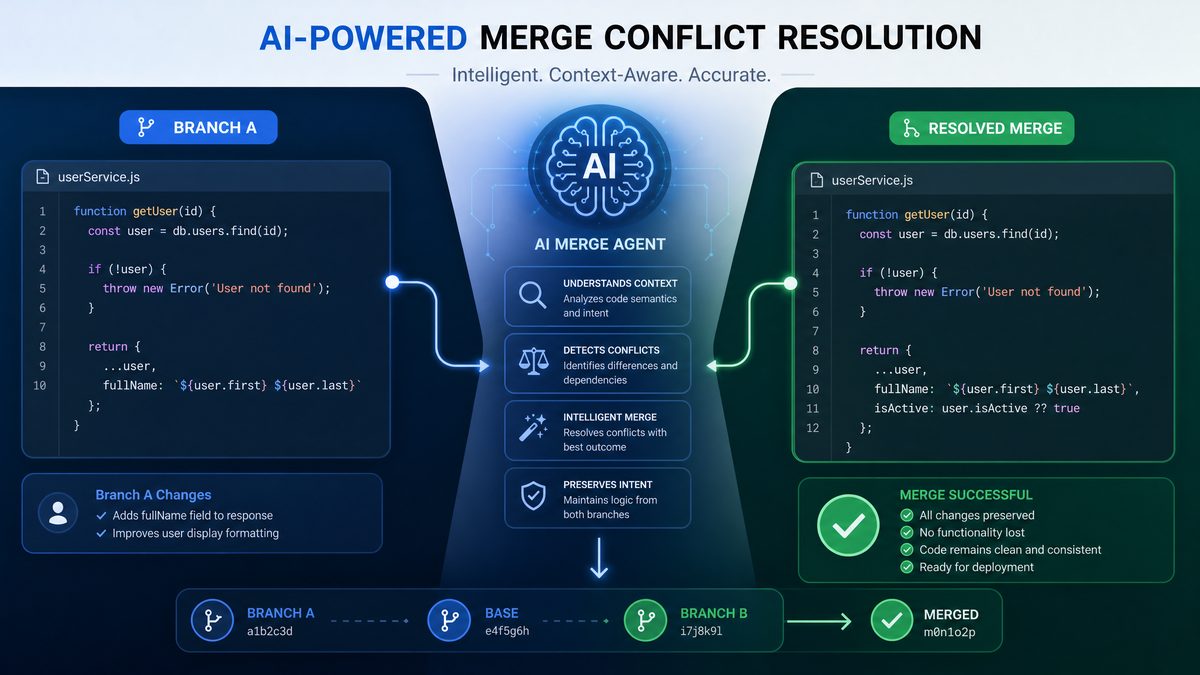
Phase 3: Agent Coordination Patterns and Dependency Management
Pure parallel execution — where every agent runs completely independently — is only possible when tasks are perfectly isolated. In practice, most real-world workflows have some inter-agent dependencies that require coordination. Codex Desktop provides three coordination patterns to handle these cases.
Pattern 1: Interface-First Coordination
The most robust coordination pattern is interface-first: before any agents begin implementation work, the interface contracts between components are defined in a shared specification document. All agents read this document as part of their context, and each agent implements against the interface rather than against another agent’s output.
This is the pattern used in the workflow definition above — the payment-api-spec.yaml file defines the exact field names, types, and method signatures that all agents implement against. The schema agent creates database columns with the exact names defined in the spec. The service agent implements methods with the exact signatures defined in the spec. The frontend agent uses the exact field names defined in the spec.
The result is that all agents can work in parallel without any runtime communication, and when their outputs are merged, they fit together correctly because they were all built against the same contract. This is the
Multi-agent parallel workflows in Codex Desktop build on the foundation established by OpenAI’s Workspace Agents platform. Our comprehensive analysis of how ChatGPT’s agent platform changes enterprise automation explains the architectural decisions that enable multiple agents to coordinate on complex organizational tasks. OpenAI Workspace Agents.
for any workflow involving multiple architectural layers.
Pattern 2: Sequential Dependencies with Agent Gates
Some tasks genuinely cannot be parallelized — a migration must run before a service that depends on the new columns can be tested against a real database, for example. For these cases, Codex Desktop supports agent gates: one agent can be configured to wait for another agent to reach a specific checkpoint before proceeding.
agents:
  - id: "migration-agent"
    name: "Migration Agent"
    # ... scope and instructions ...
    checkpoints:
      - id: "migrations-written"
        condition: "write_complete"

  - id: "integration-test-agent"
    name: "Integration Test Agent"
    depends_on:
      - agent: "migration-agent"
        checkpoint: "migrations-written"
    # This agent will not start until migration-agent
    # signals the migrations-written checkpoint
    instructions: |
      Write integration tests that run against the actual database.
      Migrations are complete when you receive this task.
Gates introduce sequential dependencies, which reduce parallelism. Use them only when the dependency is real and unavoidable — don’t add gates out of caution when the agents could actually run independently.
Pattern 3: Broadcast Coordination for Review Workflows
For code review workflows where multiple agents examine the same files, Codex Desktop supports a broadcast pattern: a single set of files is provided as read-only context to multiple agents simultaneously, and each agent produces an independent output artifact (a review report, a list of findings, a set of suggested changes).
workflow:
  name: "comprehensive-code-review"

  coordination:
    strategy: "broadcast"
    output_mode: "aggregate"  # Combine all agent outputs into single report

  broadcast_context:
    files:
      - "src/api/payments/"
      - "app/services/payments/"
    read_only: true

  agents:
    - id: "security-reviewer"
      instructions: |
        Review the provided code for security vulnerabilities.
        Focus on: SQL injection, XSS, authentication bypass,
        insecure direct object references, sensitive data exposure.
        Output findings as structured JSON with severity ratings.
      output_format: "json"
      output_schema: "schemas/security-finding.json"

    - id: "performance-reviewer"
      instructions: |
        Review the provided code for performance issues.
        Focus on: N+1 queries, missing database indexes,
        synchronous operations that should be async,
        unnecessary data loading, missing caching opportunities.
      output_format: "json"
      output_schema: "schemas/performance-finding.json"

    - id: "test-coverage-reviewer"
      instructions: |
        Analyze test coverage for the provided code.
        Identify: untested methods, missing edge cases,
        missing error path tests, integration test gaps.
      output_format: "json"
      output_schema: "schemas/coverage-finding.json"
Conflict Detection and Resolution Strategies
Even with careful task decomposition, conflicts can occur when agents modify files that weren’t anticipated to overlap, or when two agents make different assumptions about a shared interface. Codex Desktop’s conflict resolution system operates at three levels.
Level 1: Scope Conflict Prevention
The first line of defense is scope validation at workflow launch time. Before any agent begins executing, Codex Desktop analyzes the write scopes of all agents and flags any overlaps:
# Scope conflict detection output
$ codex workflow run codex-workflows/payment-integration.yaml --dry-run

✓ Validating agent scopes...
⚠ SCOPE OVERLAP DETECTED:

  api-agent writes to: config/routes.rb
  frontend-agent writes to: config/routes.rb (via src/api/payments.ts → routes)

  Recommendation: Assign config/routes.rb exclusively to api-agent.
  Frontend API client should not modify route definitions.

  Resolve this conflict before running the workflow? [y/N]
Scope conflicts caught at this stage are the cheapest to fix — they require only a configuration adjustment, not a merge resolution after the fact. Always run with --dry-run before executing a new workflow definition.
Access 40,000+ AI Prompts for ChatGPT, Claude & Codex — Free!
Subscribe to get instant access to our complete Notion Prompt Library — the largest curated collection of prompts for ChatGPT, Claude, OpenAI Codex, and other leading AI models. Optimized for real-world workflows across coding, research, content creation, and business.
Level 2: Semantic Merge
When agents modify different sections of the same file (which can legitimately happen — two agents might both add methods to a shared utility file, for example), Codex Desktop’s semantic merge engine attempts to combine the changes intelligently rather than treating them as a line-level conflict.
Semantic merge understands code structure. It knows that two new method definitions added to the same class by different agents are not in conflict — they can be merged by integrating both methods in alphabetical order, or in the order of their first agent’s completion. It knows that two different modifications to the same method body are a genuine conflict that requires human review.
# Configure semantic merge behavior
coordination:
  conflict_resolution: "semantic-merge"
  semantic_merge_options:
    method_ordering: "alphabetical"  # or "agent-completion-order"
    import_deduplication: true
    comment_merging: "preserve-all"

  # When semantic merge cannot resolve automatically:
  unresolvable_conflict_action: "pause-and-notify"  # or "prefer-agent-a", "prefer-last"
  notification_channel: "slack"
  notification_webhook: "${SLACK_WEBHOOK_URL}"
Level 3: Human Review Gates
For conflicts that cannot be resolved automatically, or for workflows where the stakes are high enough to warrant human review of all merges, Codex Desktop pauses the merge phase and presents a structured review interface. This is where the
Choosing the right model for each agent in a parallel workflow matters significantly for performance and cost. Our enterprise developer comparison guide between GPT-5.5 and Claude Opus 4.8 provides detailed benchmarks across coding, reasoning, and multi-step task completion that directly inform agent model selection. GPT-5.5 vs Claude Opus 4.8.
becomes particularly relevant — organizations can configure mandatory human review for specific file types, modules, or risk levels.
# Configure human review requirements
coordination:
  human_review_required: true
  human_review_triggers:
    - "any_conflict"
    - "files_matching: ['config/database.yml', 'config/secrets.yml']"
    - "agent_confidence_below: 0.85"
    - "lines_changed_above: 500"
Advanced Patterns: Hierarchical Agent Orchestration
For very large workflows — full-stack feature development, multi-service migrations, or organization-wide refactoring efforts — flat parallel execution with a single coordination layer may not be sufficient. Codex Desktop supports hierarchical orchestration: an orchestrator agent that dynamically decomposes tasks and spawns worker agents based on what it discovers in the codebase.
The Orchestrator-Worker Pattern
workflow:
  name: "dynamic-typescript-migration"

  orchestration:
    mode: "hierarchical"
    max_worker_agents: 12
    worker_model: "codex-1"

  agents:
    - id: "orchestrator"
      role: "orchestrator"
      model: "codex-1"
      scope:
        read:
          - "src/"
        write:
          - ".codex/worker-assignments/"  # Orchestrator writes task assignments
      instructions: |
        Analyze the src/ directory and identify all JavaScript files that
        need to be migrated to TypeScript.

        For each file, create a worker assignment in .codex/worker-assignments/
        using the worker-assignment schema. Group files by module to minimize
        cross-file dependencies within each worker's assignment.

        Spawn worker agents for each assignment group. Monitor worker progress
        and re-assign failed tasks to new workers.

        A file is ready for migration if:
        1. All files it imports have already been migrated OR are in the same worker's assignment
        2. The file has existing tests

        Do not assign more than 15 files to a single worker.

      spawn_workers:
        on_file_creation: ".codex/worker-assignments/*.yaml"
        worker_template: "templates/typescript-migration-worker.yaml"
The orchestrator pattern is powerful because it adapts to the actual structure of your codebase rather than requiring you to pre-enumerate every task. The orchestrator agent reads your code, understands the dependency graph, and creates optimal worker assignments dynamically. This is particularly valuable for large-scale migrations where the full scope isn’t known until the codebase is analyzed.
Worker Agent Template
# templates/typescript-migration-worker.yaml
agent_template:
  id: "ts-migration-worker-{{worker_id}}"
  name: "TypeScript Migration Worker {{worker_id}}"
  model: "codex-1"

  scope:
    read: "{{assignment.read_scope}}"
    write: "{{assignment.write_scope}}"

  instructions: |
    Migrate the following JavaScript files to TypeScript:
    {{assignment.files}}

    Migration requirements:
    - Rename .js files to .ts (or .tsx for React components)
    - Add explicit TypeScript types to all function parameters and return values
    - Add interface definitions for all object shapes
    - Resolve any TypeScript compiler errors
    - Do not change business logic — this is a type-only migration
    - Update import statements in the migrated files to reference .ts extensions

    Success criteria:
    - npx tsc --noEmit reports no errors for your assigned files
    - All existing tests pass: npm test -- --testPathPattern="{{assignment.test_pattern}}"

  success_criteria:
    commands:
      - "npx tsc --noEmit --include {{assignment.files}}"
      - "npm test -- --testPathPattern='{{assignment.test_pattern}}'"
Output Merging Strategies and Branch Management
The final phase of any multi-agent workflow is merging agent outputs into a coherent result. How you configure this phase has significant implications for your team’s review workflow and your CI/CD pipeline.
Merge Strategy Options
| Strategy | Description | Best For | Risk Level |
|---|---|---|---|
| Sequential Merge | Agents are merged one at a time into the feature branch, with CI running after each merge | High-risk changes, production migrations | Low |
| Batch Merge | All agent outputs are merged simultaneously once all agents complete | Feature development, new codebases | Medium |
| Staged Merge | Agents are grouped into dependency stages; each stage merges before the next stage begins | Complex features with layer dependencies | Low-Medium |
| PR-Per-Agent | Each agent’s output becomes a separate pull request for independent review | Large teams, strict review requirements | Very Low |
Configuring Staged Merge for a Feature Workflow
merge:
  strategy: "staged"

  stages:
    - name: "infrastructure"
      agents: ["schema-agent"]
      validation:
        commands:
          - "bundle exec rake db:migrate"
          - "bundle exec rake db:schema:load"
      on_failure: "abort-workflow"

    - name: "backend"
      agents: ["service-agent", "api-agent"]
      depends_on: ["infrastructure"]
      validation:
        commands:
          - "bundle exec rspec spec/services/payments/"
          - "bundle exec rspec spec/controllers/"
      on_failure: "pause-and-notify"

    - name: "frontend"
      agents: ["frontend-agent"]
      depends_on: ["backend"]
      validation:
        commands:
          - "npx tsc --noEmit"
          - "npm test -- --testPathPattern=payments"
      on_failure: "pause-and-notify"

    - name: "tests"
      agents: ["test-agent"]
      depends_on: ["backend", "frontend"]
      validation:
        commands:
          - "bundle exec rspec spec/services/payments/"
          - "bundle exec rspec spec/controllers/"
          - "npm test -- --testPathPattern=payments"
          - "bundle exec rspec --format progress | grep -E 'example.*failure'"
      on_failure: "create-review-issue"

  post_merge:
    create_pull_request: true
    pr_template: "templates/feature-pr.md"
    assign_reviewers: ["@payments-team"]
    labels: ["ai-generated", "needs-review"]
Performance Optimization: Getting Maximum Parallelism
Running five agents in parallel is not five times faster than running one agent sequentially — but with proper optimization, you can get close to that theoretical maximum. Here are the key factors that determine actual parallel speedup:
Agent Scope Sizing
Agents that are given too large a scope will take significantly longer than agents with tightly bounded scopes, creating a “long tail” problem where the workflow can’t complete until the slowest agent finishes. Aim for roughly equal estimated complexity across agents:
# Analyzing agent scope complexity before running
$ codex workflow analyze codex-workflows/payment-integration.yaml

Agent Complexity Analysis:
  schema-agent:     ~120 lines to generate  (estimated: 3 min)
  service-agent:    ~380 lines to generate  (estimated: 9 min)  ← potential bottleneck
  api-agent:        ~150 lines to generate  (estimated: 4 min)
  frontend-agent:   ~420 lines to generate  (estimated: 10 min) ← potential bottleneck
  test-agent:       ~580 lines to generate  (estimated: 14 min) ← definite bottleneck

Recommendation: Split test-agent into test-agent-backend and test-agent-frontend
for better load balancing. Consider splitting service-agent and frontend-agent.
Shared Read Context Caching
When multiple agents read the same files (like a shared interface specification), those files are cached after the first read and served from cache to subsequent agents. Ensure your shared context files are explicitly listed in a shared_context block to guarantee they’re pre-cached before agents start:
workflow:
  shared_context:
    pre_cache:
      - "docs/interfaces/payment-api-spec.yaml"
      - "docs/coding-standards.md"
      - "db/schema.rb"
      - "package.json"
      - "Gemfile.lock"
Parallelism Limits and Resource Management
Running too many agents simultaneously can cause resource contention that actually slows overall execution. Codex Desktop allows you to set a maximum concurrency limit:
workflow:
  execution:
    max_concurrent_agents: 6  # Don't run more than 6 agents simultaneously
    agent_priority:
      # Higher priority agents get resources first when at the limit
      schema-agent: 10
      service-agent: 8
      api-agent: 8
      frontend-agent: 6
      test-agent: 4
Debugging Multi-Agent Workflows
When a multi-agent workflow produces unexpected results, debugging requires a different approach than debugging single-agent sessions. The key is isolating which agent produced the problematic output and understanding what that agent’s execution context was at the time.
Agent Execution Logs
# View detailed execution log for a specific agent
$ codex workflow logs payment-integration-feature --agent service-agent

[14:23:01] service-agent: Starting execution
[14:23:01] service-agent: Reading context files (3 files, 2847 tokens)
[14:23:04] service-agent: Reading app/services/ directory (12 files)
[14:23:07] service-agent: Writing app/services/payments/payment_service.rb
[14:23:19] service-agent: Writing app/services/payments/payment_intent_service.rb
[14:23:31] service-agent: Writing app/services/payments/webhook_processor_service.rb
[14:23:44] service-agent: Running success criteria check: bundle exec ruby -c
[14:23:46] service-agent: ✓ Syntax check passed (3 files)
[14:23:46] service-agent: COMPLETE

# Replay a specific agent's execution in isolation
$ codex workflow replay payment-integration-feature --agent service-agent --interactive
Diff Analysis Per Agent
# See exactly what each agent changed
$ codex workflow diff payment-integration-feature --by-agent

=== schema-agent changes ===
+ db/migrations/20240115_create_payment_methods.rb (47 lines)
+ db/migrations/20240115_create_payment_intents.rb (52 lines)
~ db/schema.rb (+24 lines, -0 lines)

=== service-agent changes ===
+ app/services/payments/payment_service.rb (124 lines)
+ app/services/payments/payment_intent_service.rb (89 lines)
+ app/services/payments/webhook_processor_service.rb (167 lines)

=== api-agent changes ===
+ app/controllers/api/v1/payments_controller.rb (78 lines)
+ app/serializers/payment_serializer.rb (34 lines)
~ config/routes.rb (+8 lines, -0 lines)
Real-World Workflow: Full-Stack Feature in Under 20 Minutes
To make this concrete, here’s a realistic benchmark from a production workflow using the patterns described in this guide. The task: implement a complete notification preferences feature across a Rails/React application — database schema, backend services, API endpoints, frontend components, and full test coverage.
| Approach | Agents | Wall-Clock Time | Total AI Time | Lines Generated |
|---|---|---|---|---|
| Sequential (single agent) | 1 | 47 minutes | 47 minutes | 1,247 |
| Parallel (5 agents, poor decomposition) | 5 | 31 minutes | 68 minutes | 1,189 |
| Parallel (5 agents, optimized decomposition) | 5 | 14 minutes | 52 minutes | 1,312 |
| Parallel (7 agents, hierarchical) | 7 | 11 minutes | 61 minutes | 1,398 |
The key insight from this data: poor decomposition can make parallel execution slower than sequential execution (31 minutes vs. 47 minutes is only a 1.5x speedup, far below the theoretical 5x). Optimized decomposition achieves a 3.4x wall-clock speedup. The investment in proper task decomposition and interface-first coordination pays off immediately in execution time.
Security and Governance Considerations
Multi-agent workflows operating on production codebases require careful governance configuration. Each agent has the potential to make significant changes, and the speed of parallel execution means mistakes can propagate quickly if safeguards aren’t in place.
Principle of Least Privilege for Agent Scopes
Every agent should have the minimum file system access required to complete its task. Never grant broad read/write access as a convenience — always enumerate specific directories. An agent that doesn’t need to read config/credentials.yml.enc should not have it in its read scope, even if it’s technically harmless for that agent to see it.
Mandatory Validation Gates
Configure success criteria commands for every agent, and configure the workflow to abort if any agent’s success criteria fail. An agent that produces syntactically invalid code should never proceed to the merge phase:
coordination:
  abort_on_agent_failure: true
  failure_notification:
    slack: "${SLACK_WEBHOOK}"
    email: "[email protected]"
  preserve_failed_agent_output: true  # Keep output for debugging
Audit Logging
For enterprise deployments, enable comprehensive audit logging that captures every file read and write operation performed by each agent:
audit:
  enabled: true
  log_level: "full"  # Logs every file operation, not just summaries
  log_destination: "s3://company-audit-logs/codex/"
  retention_days: 90
  include_agent_reasoning: true  # Captures agent's reasoning for each decision
Conclusion: Multi-Agent Workflows as a Development Multiplier
Multi-agent parallel execution in Codex Desktop is not an incremental improvement to AI-assisted development — it’s a qualitative shift in what’s possible within a single working session. The patterns and configurations covered in this guide represent a mature approach to harnessing that shift without introducing the coordination chaos that poorly-designed parallel systems create.
The principles to carry forward are these: decompose tasks along natural architectural boundaries, establish interface contracts before agents begin executing, use scope isolation as your primary conflict prevention mechanism, and treat the merge phase as a first-class engineering concern rather than an afterthought. When these principles are applied consistently, multi-agent workflows deliver on their theoretical promise — multiple specialized agents working simultaneously, each contributing high-quality output to a unified whole.
Start with a simple two-agent workflow on a bounded feature. Validate your decomposition approach. Measure the actual wall-clock speedup. Then scale to more agents and more complex workflows as your team develops fluency with the coordination patterns. The investment in learning this architecture pays compound dividends — every workflow you run teaches you better decomposition strategies for the next one.
The development teams that master multi-agent parallel execution will operate at a fundamentally different velocity than those still working sequentially. The architecture is available today. The patterns are documented here. The only remaining variable is implementation.