
Codex Chrome Extension: How OpenAI’s Browser Agent Changes Web Automation for Enterprise Teams

Codex Chrome Extension: How OpenAI’s Browser Agent Changes Web Automation for Enterprise Teams
By the ChatGPT AI Hub Editorial Team
OpenAI’s Codex has quietly crossed a significant threshold. What began as a code-generation model has evolved into a full-stack agentic system capable of operating inside your browser — reading the DOM, intercepting network traffic, parsing console output, and executing JavaScript in real time. The Codex Chrome Extension represents a fundamental shift in how enterprise development teams can think about web automation, QA pipelines, and browser-based task orchestration.
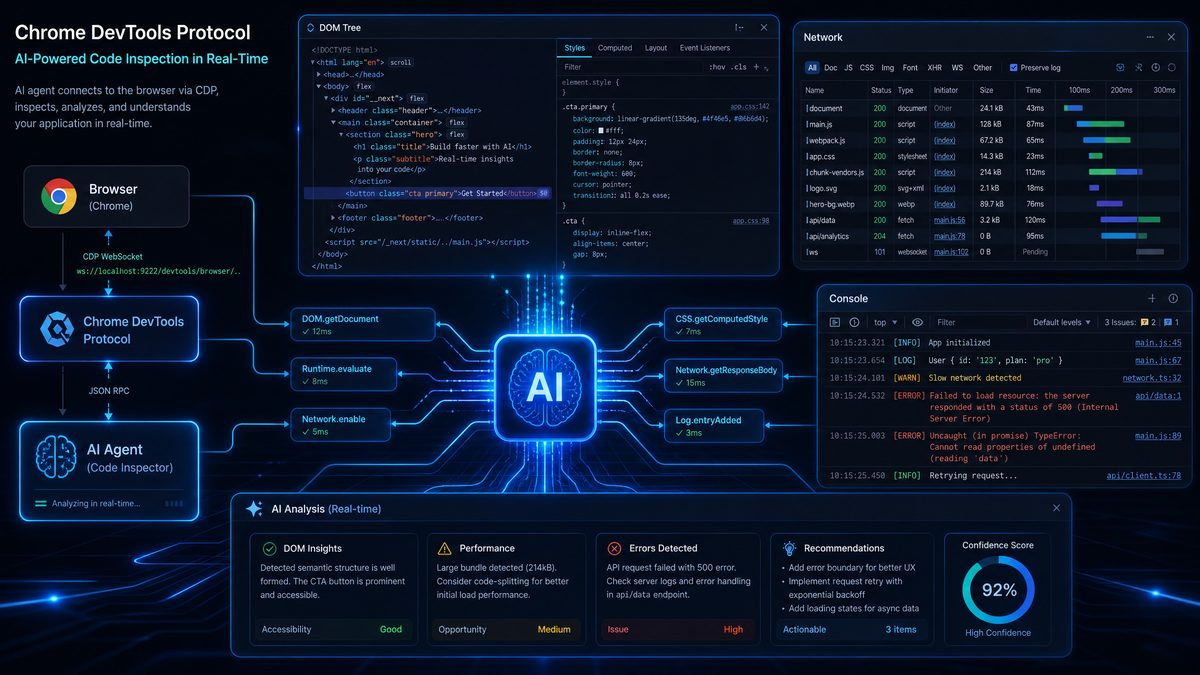
This is not a simple record-and-replay tool. The Codex Chrome Extension leverages the Chrome DevTools Protocol (CDP) — the same low-level interface used by Puppeteer, Playwright, and Chrome’s own developer tooling — to give an AI agent deep, bidirectional access to the browser runtime. The implications for enterprise teams are profound, and the security considerations are equally serious.
In this deep dive, we examine exactly how the extension works under the hood, what capabilities it unlocks, how organizations can deploy it responsibly, and why it represents a genuine inflection point in the evolution of AI-driven browser automation.
What the Codex Chrome Extension Actually Does: A Technical Foundation
To understand why the Codex Chrome Extension is architecturally different from prior browser automation approaches, you need to understand what the Chrome DevTools Protocol actually exposes. CDP is a JSON-RPC protocol that Chrome exposes over a WebSocket connection. It organizes its API surface into domains — each domain covering a distinct aspect of the browser’s internals.
The key CDP domains that the Codex extension leverages include:
- DOM domain: Enables programmatic inspection and manipulation of the Document Object Model, including node traversal, attribute reading, and structural queries without requiring the page to expose a public API.
- Network domain: Intercepts HTTP/HTTPS requests and responses, including headers, payloads, timing data, and WebSocket frames. This allows the agent to observe what API calls a page is making in real time.
- Runtime domain: Executes arbitrary JavaScript in the context of the page and retrieves return values, enabling the agent to call functions, read variables, and interact with the page’s JavaScript heap.
- Console domain: Captures all console output — logs, warnings, errors, and assertions — providing the agent with a live stream of the application’s diagnostic output.
- Page domain: Controls page lifecycle events including navigation, load states, and screenshot capture.
- Target domain: Manages multiple browser targets (tabs, workers, iframes), enabling the agent to operate across multiple browsing contexts simultaneously.
What makes the Codex extension distinctive is that it packages all of this into a Chrome Extension context, which means it operates within an authenticated browser session. Unlike headless Puppeteer scripts that must handle authentication flows explicitly, the Codex extension inherits the user’s existing signed-in state across Google, Salesforce, GitHub, Jira, enterprise SSO portals, and any other service where the user is already authenticated.
This signed-in context access is arguably the most operationally significant feature. It means an enterprise developer can instruct the Codex agent to “pull the last 30 days of billing data from our Stripe dashboard and cross-reference it with the invoices in our NetSuite instance” — and the agent can execute that task using the developer’s existing session credentials, without any API key configuration or OAuth flow implementation.
The Extension Architecture: Content Scripts, Service Workers, and the DevTools Bridge
Chrome extensions operate across several isolated JavaScript contexts, and understanding how Codex bridges them is essential for enterprise security assessments. The extension architecture consists of three primary components:
- Content Scripts: Injected directly into web page contexts, these scripts can read and modify the DOM, listen to DOM events, and communicate with the extension’s background service worker. Content scripts run with the permissions of the web page but can escalate capabilities through the extension messaging API.
- Background Service Worker: The persistent orchestration layer that manages CDP connections, communicates with OpenAI’s Codex API endpoints, maintains task state, and coordinates between multiple tabs. This is where the AI reasoning loop executes — receiving observations from the browser and issuing actions back to it.
- DevTools Panel: An optional developer-facing interface that provides visibility into what the agent is observing and doing, useful for debugging and auditing agent behavior during development and testing.
The communication flow works as follows: the background service worker establishes a CDP session with the active tab using the chrome.debugger API (a privileged Chrome extension API that requires explicit user permission). Once the debugger is attached, the agent can issue CDP commands and receive CDP events through this channel. Simultaneously, the service worker maintains a persistent WebSocket connection to OpenAI’s Codex inference endpoint, sending observations and receiving action instructions in a continuous agentic loop.
// Simplified representation of the CDP attachment flow
// used by the Codex extension's background service worker

const tabId = activeTab.id;

// Attach the Chrome debugger to the target tab
chrome.debugger.attach({ tabId }, "1.3", () => {
  if (chrome.runtime.lastError) {
    console.error("Debugger attach failed:", chrome.runtime.lastError.message);
    return;
  }

  // Enable the Network domain to intercept requests
  chrome.debugger.sendCommand({ tabId }, "Network.enable", {}, () => {
    console.log("Network domain enabled");
  });

  // Enable the DOM domain for structural inspection
  chrome.debugger.sendCommand({ tabId }, "DOM.enable", {}, () => {
    console.log("DOM domain enabled");
  });

  // Enable Runtime for JavaScript execution
  chrome.debugger.sendCommand({ tabId }, "Runtime.enable", {}, () => {
    console.log("Runtime domain enabled");
  });

  // Enable Console for log capture
  chrome.debugger.sendCommand({ tabId }, "Console.enable", {}, () => {
    console.log("Console domain enabled");
  });
});

// Listen for CDP events from the attached tab
chrome.debugger.onEvent.addListener((source, method, params) => {
  if (source.tabId !== tabId) return;

  switch (method) {
    case "Network.requestWillBeSent":
      handleNetworkRequest(params);
      break;
    case "Network.responseReceived":
      handleNetworkResponse(params);
      break;
    case "Console.messageAdded":
      handleConsoleMessage(params);
      break;
    case "Runtime.exceptionThrown":
      handleRuntimeError(params);
      break;
  }
});
This architecture means the extension is not simply scraping visible page content — it has access to the full runtime state of the application, including data that never renders to the visible DOM, background API calls, and JavaScript errors that would otherwise only be visible to a developer with DevTools open.
Background Tab Execution: Asynchronous Automation at Enterprise Scale
One of the most practically significant capabilities of the Codex Chrome Extension is its ability to execute tasks in background tabs without requiring the user to maintain focus on the automation. This is a critical distinction from simpler browser automation approaches that require the browser window to be in the foreground or that block the user’s active session during task execution.
Background tab execution works because CDP commands can be issued to any attached debugger target regardless of which tab is currently active in the browser UI. The Codex service worker can spawn a new tab, navigate it to a target URL, execute a complex multi-step workflow, extract data, and close the tab — all while the user is actively working in a different tab.
For enterprise teams, this enables a class of automation workflows that were previously impractical with browser-based approaches:
Parallel Data Aggregation Workflows
Consider an enterprise analyst who needs to compile a weekly competitive intelligence report. The Codex extension can simultaneously open background tabs for each competitor’s pricing page, documentation portal, job listings, and changelog — extracting structured data from each in parallel, normalizing it, and assembling it into a report format, all while the analyst continues their primary work.
Continuous Monitoring Tasks
The extension can maintain persistent background tab sessions that periodically check application dashboards, alert on anomalies detected in the DOM or network traffic, and surface relevant information to the user without interrupting their workflow. This is particularly valuable for monitoring SaaS dashboards that don’t expose webhook APIs or that aggregate data from multiple internal systems.
Multi-Step Form Automation with Validation
Enterprise workflows frequently involve complex multi-step forms in legacy web applications — procurement systems, HR portals, compliance platforms — that lack API access. The Codex extension can navigate these flows in background tabs, filling forms based on structured data inputs, validating responses at each step, handling error states intelligently, and reporting completion status back to the user.
// Example: Codex agent action sequence for background tab automation
// This represents the structured action format the agent uses

const automationTask = {
  taskId: "procurement-form-submission-001",
  targetUrl: "https://internal.procurement.enterprise.com/new-request",
  backgroundExecution: true,
  steps: [
    {
      action: "navigate",
      url: "https://internal.procurement.enterprise.com/new-request",
      waitFor: "DOM.loadEventFired"
    },
    {
      action: "dom.query",
      selector: "#vendor-name-input",
      operation: "setValue",
      value: "{{vendor.name}}"
    },
    {
      action: "dom.query",
      selector: "#purchase-amount",
      operation: "setValue",
      value: "{{order.totalAmount}}"
    },
    {
      action: "runtime.evaluate",
      expression: "document.querySelector('#approval-tier').textContent",
      captureAs: "approvalTier"
    },
    {
      action: "conditional",
      condition: "approvalTier === 'Level 2'",
      ifTrue: {
        action: "dom.query",
        selector: "#manager-approval-checkbox",
        operation: "click"
      }
    },
    {
      action: "dom.query",
      selector: "#submit-button",
      operation: "click",
      waitFor: "Network.responseReceived",
      validateResponse: {
        statusCode: 200,
        bodyContains: "Request submitted successfully"
      }
    }
  ],
  onError: "pause-and-notify",
  reportTo: "user-session"
};
Signed-In Context Access: The Authentication Advantage and Its Security Implications
The signed-in context capability deserves extended analysis because it fundamentally changes the risk profile of browser automation in enterprise environments. Traditional automation approaches — whether Selenium scripts, Puppeteer workflows, or RPA tools — typically require explicit credential management. Credentials must be stored somewhere, rotated, protected, and audited. This creates a significant operational burden and a meaningful attack surface.
The Codex extension’s use of the existing browser session sidesteps this problem architecturally. The extension never sees or handles credentials directly. It simply operates within the security context that the browser has already established through the user’s normal authentication flows — including MFA, hardware keys, SSO, and certificate-based authentication. From the perspective of the web application being automated, the requests look identical to those made by the human user directly.
This is simultaneously the feature’s greatest strength and its most significant security concern for enterprise security teams.
Security Considerations for Enterprise Deployment
Security architects evaluating the Codex Chrome Extension need to think carefully about several threat vectors:
| Threat Vector | Risk Level | Mitigation Strategy |
|---|---|---|
| Privilege escalation via session inheritance | High | Restrict extension to non-privileged user accounts; implement task approval workflows |
| Data exfiltration through network interception | High | Audit CDP network domain usage; implement DLP policies on extension API calls |
| Unauthorized form submission in enterprise systems | Medium-High | Require human confirmation for write operations; implement action whitelisting |
| Credential harvesting via Runtime.evaluate | Medium | Monitor and restrict JavaScript execution scope; implement CSP policies |
| Session token exposure through Console/Network domains | Medium | Implement token masking in CDP event streams; restrict domain access per task type |
| Insider threat via agent task manipulation | Medium | Immutable audit logging of all agent actions; task review queues for sensitive operations |
| Supply chain risk via extension updates | Medium | Pin extension version; use enterprise Chrome policy to control update timing |
| Cross-origin data leakage between tabs | Low-Medium | Enforce tab isolation policies; restrict multi-tab access to same-origin contexts |
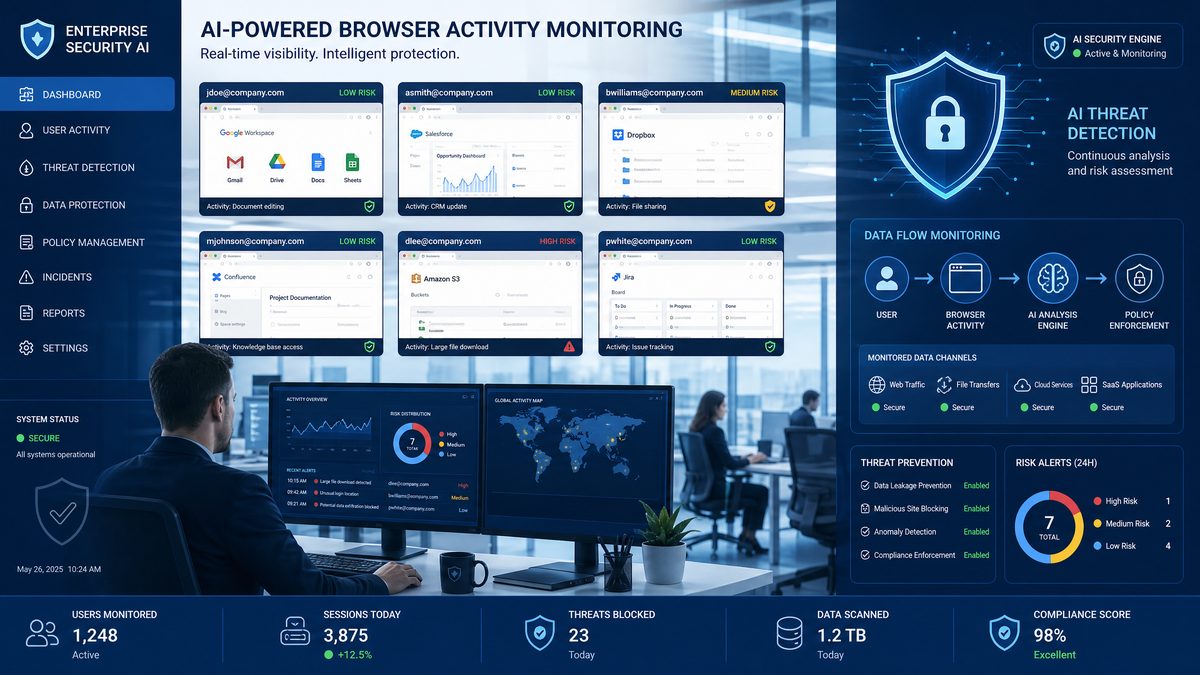
Enterprise security teams should treat the Codex extension with the same scrutiny applied to any privileged endpoint agent. The chrome.debugger API permission — which the extension requires — is one of the most powerful permission scopes in the Chrome extension model. It effectively grants the extension the ability to inspect and modify any web content the user can access. This is not a permission to be granted casually.
Enterprise Chrome Policy Controls
Organizations managing Chrome through Google Workspace or Microsoft Intune can apply Chrome enterprise policies to control extension behavior. The following policy configuration provides a starting point for enterprise deployments:
// Chrome Enterprise Policy JSON
// Deploy via Google Workspace Admin Console or Intune MDM

{
  "ExtensionSettings": {
    // Codex Chrome Extension ID (example format)
    "abcdefghijklmnopqrstuvwxyz012345": {
      "installation_mode": "force_installed",
      "update_url": "https://clients2.google.com/service/update2/crx",
      "runtime_allowed_hosts": [
        "https://*.enterprise-internal.com/*",
        "https://*.approved-saas-vendor.com/*"
      ],
      "runtime_blocked_hosts": [
        "*://*.personal-email.com/*",
        "*://*.social-media.com/*"
      ],
      "blocked_permissions": [],
      "allowed_permissions": ["debugger", "tabs", "storage"]
    }
  },
  "ExtensionInstallBlocklist": ["*"],
  "ExtensionInstallAllowlist": [
    "abcdefghijklmnopqrstuvwxyz012345"
  ],
  "DeveloperToolsAvailability": 1,
  "URLBlocklist": [],
  "URLAllowlist": [
    "https://api.openai.com/v1/codex/*"
  ]
}
Enterprise Deployment Strategies: From Pilot to Production
Rolling out the Codex Chrome Extension across an enterprise requires a structured approach that balances productivity gains against security governance requirements. Organizations that have successfully deployed AI browser agents at scale tend to follow a phased model that progressively expands the agent’s operational scope as trust is established.
Phase 1: Controlled Pilot with Read-Only Operations
The initial deployment phase should restrict the agent to read-only operations — data extraction, monitoring, and reporting — while explicitly blocking write operations like form submissions, button clicks that trigger transactions, and API calls with side effects. This allows teams to validate the agent’s accuracy and reliability without risking data integrity in production systems.
Pilot teams should be selected from groups with clearly defined automation use cases and technical sophistication sufficient to evaluate agent output quality. QA engineering teams, data analytics teams, and developer experience teams are typically good candidates for initial pilots.
Key metrics to track during Phase 1:
- Task completion rate (agent successfully completes assigned task without human intervention)
- Accuracy rate (extracted data matches ground truth validation)
- Error recovery rate (agent correctly identifies and handles error states)
- Session stability (agent maintains functional state across extended task sequences)
- Performance impact (CPU/memory overhead on user machines during background execution)
Phase 2: Supervised Write Operations
After establishing baseline reliability metrics from Phase 1, the second phase introduces write operations under human supervision. Every action that modifies state in an enterprise system — form submissions, record creation, configuration changes — is queued for human review before execution. The agent presents its intended action sequence to the user, who approves or modifies it before the agent proceeds.
This approval workflow serves two purposes: it maintains human oversight of consequential actions, and it generates a labeled dataset of approved and rejected action sequences that can be used to fine-tune the agent’s decision-making for organization-specific contexts.
Phase 3: Autonomous Operation with Guardrails
Full autonomous operation is appropriate only for well-defined, thoroughly tested task categories with robust rollback capabilities. The Codex extension should operate autonomously only within explicitly defined operational boundaries — specific URLs, specific action types, specific data domains — with automatic escalation to human review when it encounters conditions outside its trained operational envelope.
The
For teams already using Codex for autonomous background code operations, the Chrome Extension adds a powerful new dimension. Our detailed guide on Codex Background Tasks covers 30 production-ready prompts for autonomous code review, refactoring, and continuous improvement workflows that pair naturally with browser-based automation. Codex Background Tasks Masterclass.
provides detailed guidance on configuring these operational boundaries through the Codex API’s system prompt and tool-use parameters.
Practical Use Cases: Where the Codex Extension Delivers Measurable ROI
Abstract capability descriptions are less useful to enterprise decision-makers than concrete use cases with clear value propositions. Based on the technical capabilities described above, the following use cases represent high-value applications of the Codex Chrome Extension in enterprise contexts.
1. Legacy Application Modernization Bridge
Many enterprises maintain critical business processes in legacy web applications that predate modern API design — older ERP systems, custom-built internal tools from the early 2000s, vendor portals that have never offered programmatic access. The Codex extension can serve as an API layer for these systems, enabling modern workflows to interact with legacy applications through the browser interface without requiring costly modernization projects.
A manufacturing enterprise, for example, might use the extension to extract production scheduling data from a 15-year-old MES web interface, transform it into a structured format, and push it into a modern data warehouse — eliminating a manual data entry process that previously required dedicated staff hours each day.
2. Cross-Platform Data Reconciliation
Enterprise data is frequently fragmented across multiple SaaS platforms that lack native integration capabilities or whose native integrations don’t surface the specific data combinations needed for business processes. The Codex extension can navigate multiple authenticated sessions simultaneously, extracting complementary data sets and reconciling them according to business logic defined in natural language task descriptions.
3. Automated QA and Regression Testing
The extension’s access to console output, network traffic, and runtime errors makes it particularly powerful for QA automation. Unlike traditional Selenium-based test automation that validates only visible UI state, the Codex extension can validate that the correct API calls were made, that no JavaScript errors occurred, that network responses contained expected data structures, and that the application’s internal state is consistent — all simultaneously, in a single test execution.
// Example: Codex QA validation task configuration
// Validates both UI state and underlying runtime behavior

const qaValidationTask = {
  testName: "checkout-flow-complete-validation",
  targetUrl: "https://staging.ecommerce.enterprise.com",
  validations: [
    {
      type: "dom",
      selector: "#order-confirmation-number",
      assertion: "exists",
      description: "Confirmation number element rendered"
    },
    {
      type: "network",
      urlPattern: "/api/v2/orders",
      method: "POST",
      expectedStatus: 201,
      expectedResponseSchema: {
        orderId: "string",
        status: "confirmed",
        items: "array"
      },
      description: "Order creation API called successfully"
    },
    {
      type: "console",
      level: "error",
      assertion: "absent",
      description: "No JavaScript errors during checkout"
    },
    {
      type: "runtime",
      expression: "window.__analytics.lastEvent.name",
      expectedValue: "purchase_complete",
      description: "Analytics purchase event fired"
    },
    {
      type: "network",
      urlPattern: "/api/v2/inventory",
      method: "PATCH",
      assertion: "called",
      description: "Inventory update triggered post-purchase"
    }
  ]
};
4. Competitive Intelligence and Market Monitoring
Sales and marketing teams can leverage the extension to maintain continuous monitoring of competitor websites, pricing pages, product documentation, and job postings — extracting structured intelligence that would otherwise require manual research hours. The extension’s ability to navigate JavaScript-heavy single-page applications that resist traditional web scraping makes it particularly effective for monitoring modern SaaS competitor interfaces.
Access 40,000+ AI Prompts for ChatGPT, Claude & Codex — Free!
Subscribe to get instant access to our complete Notion Prompt Library — the largest curated collection of prompts for ChatGPT, Claude, OpenAI Codex, and other leading AI models. Optimized for real-world workflows across coding, research, content creation, and business.
5. Compliance Documentation and Audit Trail Generation
Regulated industries require detailed documentation of specific web-based processes — demonstrating that compliance checks were performed, that disclosures were reviewed, that approval workflows were followed. The Codex extension can execute these workflows while simultaneously generating timestamped, structured audit trails that capture DOM state, network activity, and user actions at each step, providing compliance teams with defensible documentation of process execution.
The Chrome DevTools Protocol Deep Dive: Capabilities Enterprise Developers Need to Understand
For enterprise developers building on top of the Codex extension or integrating it into existing automation infrastructure, a deeper understanding of specific CDP capabilities is essential. The following breakdown covers the most consequential CDP features from an enterprise automation perspective.
Network Domain: Beyond Request Interception
The CDP Network domain is far more capable than simple request/response logging. Enterprise developers should be aware of these specific capabilities:
- Request interception and modification:
Network.setRequestInterceptionallows the agent to intercept requests before they are sent, modify headers, change request bodies, or abort requests entirely. This enables sophisticated testing scenarios like fault injection and API mocking without modifying application code. - Response body access:
Network.getResponseBodyretrieves the full response body for any network request, including those that don’t render to the DOM. This is critical for extracting data from API responses that are consumed by JavaScript but never displayed directly. - WebSocket frame inspection: CDP can capture WebSocket frames in both directions, enabling the agent to observe and interact with real-time data streams from applications using WebSocket APIs.
- Cache control: The agent can clear browser cache and disable cache entirely for specific test scenarios, ensuring reproducible results in automated testing workflows.
Runtime Domain: JavaScript Execution Context Management
The Runtime domain’s Runtime.evaluate and Runtime.callFunctionOn methods give the agent direct access to the page’s JavaScript execution context. Key enterprise considerations:
- Expressions execute in the context of the main frame by default, but can be targeted to specific iframes, web workers, or service workers using execution context IDs.
- The
awaitPromiseparameter allows the agent to execute async JavaScript and await its resolution, enabling interaction with Promise-based APIs. - The
returnByValueparameter controls whether complex objects are serialized and returned by value or referenced by handle — important for performance when working with large data structures. - Runtime evaluation can be restricted using Content Security Policy headers, which enterprise security teams can leverage to limit the agent’s JavaScript execution capabilities on specific sensitive applications.
DOM Domain: Structural Navigation Beyond CSS Selectors
While CSS selectors cover most DOM interaction needs, the CDP DOM domain provides additional capabilities relevant to enterprise automation:
- Shadow DOM traversal:
DOM.getDocumentwithpierce: trueenables traversal of shadow DOM trees, which is essential for automating modern web components built with frameworks like Lit, Stencil, or native Web Components — increasingly common in enterprise design systems. - Accessibility tree access: The Accessibility domain (closely related to DOM) exposes the browser’s accessibility tree, providing semantic element descriptions that are more robust to UI changes than positional selectors.
- Node search by XPath:
DOM.performSearchsupports XPath queries in addition to CSS selectors, providing flexibility for navigating complex document structures.
For teams already invested in browser automation infrastructure, understanding how the Codex extension’s CDP usage compares to existing tools is important. The
Browser automation becomes especially powerful when combined with commerce workflows. Our complete developer guide on building agentic commerce workflows with OpenAI and Visa’s partnership demonstrates how AI agents can autonomously navigate payment flows, manage transactions, and handle authenticated web sessions at enterprise scale. Agentic Commerce Workflows.
provides a useful framework for evaluating where the Codex extension fits within a broader automation toolchain.
Performance Considerations and Resource Management
Enterprise deployments must account for the resource overhead of running an AI-driven browser agent alongside normal user workflows. The Codex extension’s background tab execution model is designed to minimize impact on the user’s active session, but there are important performance considerations to plan for.
CPU and Memory Impact
CDP event streams — particularly the Network and Runtime domains — can generate substantial data volumes on complex web applications. Enterprise deployments should configure selective domain enablement, activating only the CDP domains required for specific task types rather than enabling all domains globally.
| CDP Domain | Typical Memory Overhead | CPU Impact | Recommended for Background Tasks |
|---|---|---|---|
| DOM | Low (5-20MB for typical pages) | Low | Yes |
| Network | Medium (scales with request volume) | Medium | Yes, with response body filtering |
| Runtime | Low-Medium | Medium (during evaluation) | Yes, with async execution |
| Console | Low | Low | Yes |
| Profiler | High | High | No (foreground only) |
| HeapProfiler | Very High | High | No (foreground only) |
API Rate Limits and Cost Management
The Codex extension’s agentic loop makes API calls to OpenAI’s Codex inference endpoint for each reasoning step. For complex multi-step tasks, this can accumulate significant token consumption. Enterprise teams should implement task budgeting — defining maximum token budgets per task type — and monitor API consumption through OpenAI’s usage dashboard to prevent unexpected cost overruns during initial deployment phases.
Task decomposition strategies that break complex workflows into smaller, more deterministic sub-tasks can significantly reduce API costs by limiting the reasoning scope required at each step. Well-defined sub-tasks with clear success criteria require fewer reasoning tokens than open-ended instructions.
Integration with Enterprise Automation Infrastructure
The Codex Chrome Extension does not need to operate in isolation. For organizations with existing automation infrastructure — CI/CD pipelines, RPA platforms, data integration tools — the extension can be integrated as a specialized component for browser-based tasks within broader automation workflows.
Webhook and API Integration Patterns
The extension’s background service worker can be configured to emit task completion events to enterprise webhooks, enabling integration with orchestration platforms like Apache Airflow, Temporal, or Zapier Enterprise. A task completion event might trigger downstream processes — sending extracted data to a data warehouse, updating a record in Salesforce, or triggering a notification in Slack — creating end-to-end automation pipelines that span browser-based and API-based systems.
// Task completion webhook payload format
// Emitted by the Codex extension on task completion

{
  "taskId": "competitive-pricing-extraction-2024-01-15",
  "status": "completed",
  "completedAt": "2024-01-15T14:32:07Z",
  "executionDurationMs": 45230,
  "result": {
    "extractedRecords": 47,
    "validationsPassed": 47,
    "validationsFailed": 0,
    "data": [
      {
        "competitor": "CompetitorA",
        "product": "Enterprise Plan",
        "price": 299.00,
        "currency": "USD",
        "billingCycle": "monthly",
        "extractedAt": "2024-01-15T14:31:52Z"
      }
    ]
  },
  "agentActions": [
    {
      "step": 1,
      "action": "navigate",
      "target": "https://competitor-a.com/pricing",
      "durationMs": 1240
    },
    {
      "step": 2,
      "action": "dom.extract",
      "selector": ".pricing-table",
      "durationMs": 340
    }
  ],
  "networkSummary": {
    "requestCount": 23,
    "totalBytesReceived": 847293
  }
}
The Competitive Landscape: How Codex Compares to Existing Browser Automation Approaches
Enterprise teams evaluating the Codex Chrome Extension need to understand how it positions against established browser automation tools and where each approach is most appropriate.
| Capability | Codex Extension | Playwright/Puppeteer | Selenium | RPA Tools (UiPath, AA) |
|---|---|---|---|---|
| Natural language task definition | ✅ Native | ❌ Code only | ❌ Code only | ⚠️ Limited |
| Signed-in session inheritance | ✅ Native | ⚠️ Requires setup | ⚠️ Requires setup | ✅ Yes |
| Adaptive error recovery | ✅ AI-driven | ❌ Manual handling | ❌ Manual handling | ⚠️ Rule-based |
| Headless execution | ⚠️ Background tabs | ✅ Full headless | ✅ Full headless | ⚠️ Attended/unattended |
| CI/CD pipeline integration | ⚠️ Via webhook | ✅ Native | ✅ Native | ⚠️ Limited |
| Shadow DOM support | ✅ Via CDP | ✅ Native | ⚠️ Limited | ⚠️ Limited |
| Network traffic inspection | ✅ Full CDP access | ✅ Full CDP access | ⚠️ Limited | ❌ None |
| Enterprise security controls | ✅ Chrome policy | ✅ Infrastructure-level | ✅ Infrastructure-level | ✅ Native governance |
The Codex extension is not a replacement for Playwright or Puppeteer in CI/CD-integrated testing pipelines where deterministic, version-controlled test scripts are required. Its strengths are in ad-hoc automation, adaptive task execution, and scenarios where the task definition is best expressed in natural language rather than imperative code. The two approaches are complementary rather than competitive for most enterprise automation portfolios.
Looking Ahead: The Trajectory of AI Browser Agents in Enterprise
The Codex Chrome Extension represents the current state of AI browser agents, but the trajectory points toward capabilities that will further expand the scope of what’s automatable. Several developments on the near-term horizon are worth monitoring for enterprise planning purposes.
Multi-agent coordination — where multiple Codex instances collaborate on complex tasks, each specializing in different aspects of a workflow — is an architectural pattern that OpenAI’s research direction clearly anticipates. The implications for enterprise automation are significant: workflows that currently require human coordination between multiple specialists could be executed by coordinated agent teams operating across multiple authenticated browser sessions simultaneously.
Persistent memory and organizational knowledge graphs will enable the Codex agent to accumulate institutional knowledge about an organization’s specific applications, workflows, and data patterns over time — becoming progressively more effective at enterprise-specific tasks without requiring explicit retraining.
The integration of vision capabilities alongside DOM inspection means the agent will be able to handle applications where the semantic structure of the DOM doesn’t accurately reflect the visual organization of information — a common challenge with legacy applications and certain JavaScript framework rendering patterns.
Conclusion: A Genuine Inflection Point for Enterprise Web Automation
The Codex Chrome Extension is not an incremental improvement on existing browser automation tools. It represents a qualitative shift in the relationship between AI systems and web-based enterprise infrastructure. By combining the deep technical access of the Chrome DevTools Protocol with the reasoning capabilities of OpenAI’s Codex models, and wrapping that combination in the authenticated browser context of a real enterprise user, it creates an automation capability that is simultaneously more powerful and more accessible than anything that has come before it.
For enterprise development teams, the practical implications are immediate and actionable. Legacy applications that have resisted automation because they lack APIs are now automatable. Cross-platform data workflows that required custom integration development can be described in natural language and executed on demand. QA processes that validated only surface-level UI behavior can now validate the full stack of observable application behavior — DOM, network, runtime, and console — in a single automated pass.
The security implications are real and demand serious attention. The chrome.debugger permission is powerful, and the signed-in session inheritance model means the agent operates with the full privileges of the authenticated user. Enterprise security teams must engage with this technology proactively — developing governance frameworks, deployment policies, and monitoring infrastructure before broad rollout rather than after.
But for organizations that approach this technology with appropriate rigor, the productivity multiplier is substantial. The manual browser-based workflows that consume hours of skilled knowledge worker time each week — data extraction, cross-system reconciliation, legacy application interaction, compliance documentation — are exactly the class of tasks that the Codex Chrome Extension is designed to automate. The question for enterprise leaders is not whether this technology will reshape web automation in their organizations, but how quickly and how safely they can harness it.
The browser has always been the universal interface for enterprise software. The Codex Chrome Extension makes it, for the first time, a genuinely programmable one — not just for developers writing automation scripts, but for any knowledge worker who can describe what they need done.